
At Datum, we run into scenarios every day that require exposing localhost to the internet. Our web dev team shares work-in-progress staging links, engineering tests webhooks, someone's building an app, someone else is debugging OAuth callbacks — and all of it grinds to a halt the moment you hit a firewall or NAT boundary.
As a new startup that needs to collaborate fast without jumping through firewall hoops or wrestling with configuration variables, we needed something our own team could actually use. That's why we decided to create Datum Desktop: where we can create a tunnel and within seconds a local service is reachable at a public HTTPS URL. No port forwarding, no firewall rules, no configuration.
Here's what it took to get there.
The Problem
Exposing a local service to the internet is deceptively hard. The service might be behind a corporate NAT, a home router, or a firewall that blocks all inbound connections. Traditional solutions like port forwarding, VPNs, and reverse SSH tunnels are fragile, require manual setup, and don't scale.
We wanted something better: a tunnel that spins up in seconds, works anywhere in the world, and hands you a public HTTPS URL. That's it.
Building Blocks
Before diving into how everything fits together, here's a quick look at the core technologies we chose and why.
QUIC
Tunnels traditionally rely on an inbound listener, which is fundamentally at odds with zero-trust principles. We needed outbound-only connections, and QUIC gave us exactly the properties tunneling demands:
- Multiplexed streams — A single QUIC connection supports thousands of independent bidirectional streams with no head-of-line blocking. Streams can be short-lived (one per HTTP request) or long-lived (WebSockets, streaming responses), and opening a new stream is nearly free.
- Built-in encryption — Every QUIC connection uses TLS 1.3. Both sides cryptographically verify each other's identity during the handshake.
- Connection migration — QUIC connections survive IP address changes (laptop moves from WiFi to cellular) because connections are identified by a connection ID, not a socket address.
- UDP-based — Operating over UDP makes NAT traversal significantly easier than TCP-based alternatives.
iroh
Evaluating QUIC-based solutions led us to iroh — a Rust implementation of QUIC-based peer-to-peer networking. iroh adds a critical layer on top of raw QUIC: every node gets a persistent Ed25519 keypair that serves as both its identity and its address. Instead of connecting to an IP, you connect to a public key and iroh figures out how to reach it.
Envoy Gateway
Envoy sits at the edge, facing the public internet. It handles TLS termination, HTTP routing, and — through some clever patching we'll get into later — bridges the gap between standard HTTP traffic and our QUIC tunnel network.
How They Work Together
With the building blocks in place, here's how the pieces connect — from NAT traversal to discovery to the gateway that ties it all together.
Getting Through NATs
NAT traversal is the hardest part of peer-to-peer connectivity, and iroh's magicsock abstraction is what got us across the line.
Learning the public address. When a node connects to a relay server over QUIC, the relay observes the client’s source IP and port as seen from the public internet. This is QUIC Address Discovery (QAD), which can provide public IPv4 and IPv6 candidates. iroh also uses iroh-net-report to probe network conditions — analyzing NAT type, available IP versions, and reachable paths. Unlike traditional STUN, these probes run over QUIC, so address discovery is encrypted and requires no additional round-trips compared to STUN's plaintext UDP exchanges.
Home relays. Each node maintains a preferred ("home") relay to help facilitate connectivity. iroh periodically re-evaluates relay preference using network probing and can switch when conditions change. When another endpoint wants to reach this node, it first contacts the home relay to coordinate a connection. We operate relay servers distributed globally across North America, South America, Europe, Africa, and Asia-Pacific. Nodes automatically select the nearest one based on latency probing.
Direct P2P vs. relay. Once two endpoints want to communicate, magicsock can hedge across direct and relay paths when direct quality is uncertain, then converge to the best path with automatic fallback.:
┌─────────┐ ┌─────────┐ │ Gateway │──── Direct UDP (hole-punched) ───────────│ Desktop │ │ Endpoint│ │ Node │ │ │──── Via Home Relay (encrypted relay) ────│ │ └─────────┘ └─────────┘ ↑ ↑ └── both paths tried in parallel ──┘ └── fastest wins, automatic failover ─┘Direct P2P is preferred. Using discovered public address candidates (from QAD and net-report probing), both sides send UDP packets to establish and validate a direct path. If NAT behavior or firewall policy blocks direct connectivity (for example, symmetric NAT on both sides), traffic falls back to the relay path.
The key insight: you don’t have to choose. magicsock continuously monitors path quality and revalidates connectivity, hedging across direct and relay when needed. If a direct path degrades it falls back to relay, and if direct connectivity later becomes viable it upgrades back automatically. The application layer does not need to manage these transitions.
Discovery: Finding Nodes by Public Key
When the gateway needs to connect to a desktop node, it has a public key — but it still needs reachable addresses. We leaned on iroh's pluggable discovery mechanism to run two layers simultaneously: DNS-based discovery as the primary method (endpoint addressing information published as DNS TXT records keyed by the node's public key) and pkarr DHT (if enabled) as a secondary lookup path. Both run in parallel for maximum reachability.
Keeping the Control Plane Fresh
In any distributed connectivity system, the control plane is only as useful as the data it holds, and stale data becomes problematic fast. We built a heartbeat agent into the desktop node that continuously reads its current addresses and relay information, then patches a Kubernetes Connector resource with its node ID, public addresses, home relay, and discovery mode. This ensures the control plane always has fresh connectivity information for routing decisions.
Bridging HTTP and QUIC: The Gateway
The piece we had to build ourselves was the bridge between the public internet (HTTP/HTTPS) and the iroh tunnel network (QUIC) — the iroh gateway.
Envoy Gateway faces the internet and handles TLS termination and HTTP routing. When a request needs to reach a tunneled backend, Envoy forwards it to the iroh gateway, which reads the target endpoint ID and backend address from request metadata, looks up or establishes a QUIC connection to that endpoint, opens a new QUIC stream, forwards the request, and streams the response back through Envoy to the client.
Envoy iroh-gateway Desktop Node │ │ │ │── HTTP request ────────→ │ │ │ (via Unix socket) │ │ │ │── resolve endpoint ID ────→ │ │ │ from request metadata │ │ │ │ │ │── open QUIC stream ────────→ │ │ │ (reuse connection or │ │ │ establish new one) │ │ │ │ │ │── forward request ─────────→ │ │ │ over QUIC stream │ │ │ │ │ │←── HTTP response ────────── │ │←── HTTP response ────────│ │ │ │ │Programming Envoy: From Hostname to Tunnel
One of the more interesting challenges was programming Envoy to route external hostnames through to iroh tunnels. Standard Envoy routing doesn't work here — the backends aren't reachable over the network. They're behind tunnels.
When a tunnel is created, the control plane creates an HTTPProxy resource declaring the external hostname and backend connector. The network-services-operator reconciles this into Envoy configuration. The trick was using EnvoyPatchPolicy to inject tunnel-aware routing into Envoy. When an HTTPProxy has connector backends, the operator generates JSON patches that create tunnel clusters (pointing to an internal connector-tunnel listener instead of a network address), register domains on the HTTPS listener, and add CONNECT routes to upgrade HTTP connections into tunnel mode.
The connector-tunnel internal listener receives these requests, extracts the tunnel metadata, and sends an HTTP/2 CONNECT request to the iroh gateway. The gateway reads the metadata and establishes the QUIC tunnel to the target node.
This approach let us keep Envoy Gateway as the edge proxy — TLS termination, HTTP/2, standard routing — while grafting tunnel-aware routing on top through patch policies. No custom Envoy builds, no forked control plane.
How Traffic Flows End to End
Here's the full path when a browser hits https://myapp.tunnels.datum.net/api/users:
- DNS resolves the hostname to the edge cluster's Envoy Gateway IP.
- Envoy terminates TLS and matches the request against HTTPRoute rules generated from the HTTPProxy resource.
- Internal routing sends the request to the
connector-tunnellistener with tunnel metadata (endpoint ID + target address). - The internal listener sends an HTTP/2 CONNECT to the iroh gateway.
- The iroh gateway looks up or establishes a QUIC connection to the desktop node — magicsock handles discovery, hole-punching, and relay fallback — and opens a new stream.
- The desktop node receives the request, validates it, and forwards it to the local service.
- The response flows back: local service → desktop node → QUIC stream → iroh gateway → Envoy → browser.
From the outside, it's just an HTTPS URL. Under the hood, the request crossed a NAT boundary over an encrypted peer-to-peer tunnel with automatic failover — and the developer running that local service didn't configure anything.
Insights and Learnings
A few things stood out as we built this.
Connection caching matters. The gateway caches QUIC connections per endpoint ID. Since QUIC connections are long-lived and support multiplexed streams, a single connection to a desktop node can serve thousands of concurrent requests. Establishing a connection involves a cryptographic handshake, but opening a new stream within an existing connection is essentially free.
No shared tunnel state. On the desktop side, each request arrives on its own QUIC stream and gets forwarded to the local service independently. No head-of-line blocking between concurrent requests, no shared state to corrupt.
Stale data is the enemy. The heartbeat-and-lease pattern for keeping the control plane updated was born from painful debugging sessions where routing decisions were made on outdated connectivity info. Fresh data isn't optional — it's the whole game.
Don't make the developer choose. The dual-path approach (direct P2P + relay fallback) with continuous probing means developers never have to think about their network topology. It just works — and if conditions change mid-session, the system adapts without dropping a beat.
Patch, don't fork. Using EnvoyPatchPolicy to graft tunnel routing onto standard Envoy Gateway was the right call. It keeps us on the upgrade path for Envoy without maintaining a custom fork, and the tunnel logic stays cleanly separated from standard edge routing.
Architecture at a Glance
| Component | Technology | Role |
| Transport | QUIC (iroh/noq) | Multiplexed, encrypted, NAT-friendly tunnels |
| Identity | Ed25519 keypairs | Endpoint authentication and addressing |
| Discovery | DNS TXT + pkarr DHT | Resolves node IDs to reachable addresses |
| NAT Traversal | magicsock + QAD | Hole punching with relay fallback |
| Relay | iroh-relay | Global fallback connectivity + address discovery |
| Edge Routing | Envoy Gateway | TLS termination, HTTP routing, CONNECT tunneling |
| Tunnel Bridge | iroh-gateway | Translates HTTP to QUIC, manages connection pool |
| Control Plane | network-services-operator | Programs Envoy via EnvoyPatchPolicy from HTTPProxy specs |
| Desktop Proxy | iroh-proxy-utils | Accepts QUIC streams, forwards to local services |
Go Try It
We're still early days with Datum Desktop, but we're proud of where it's landed: Datum establishes a tunnel, and a local service gets a public HTTPS URL backed by encrypted P2P connections with automatic NAT traversal and global relay fallback.
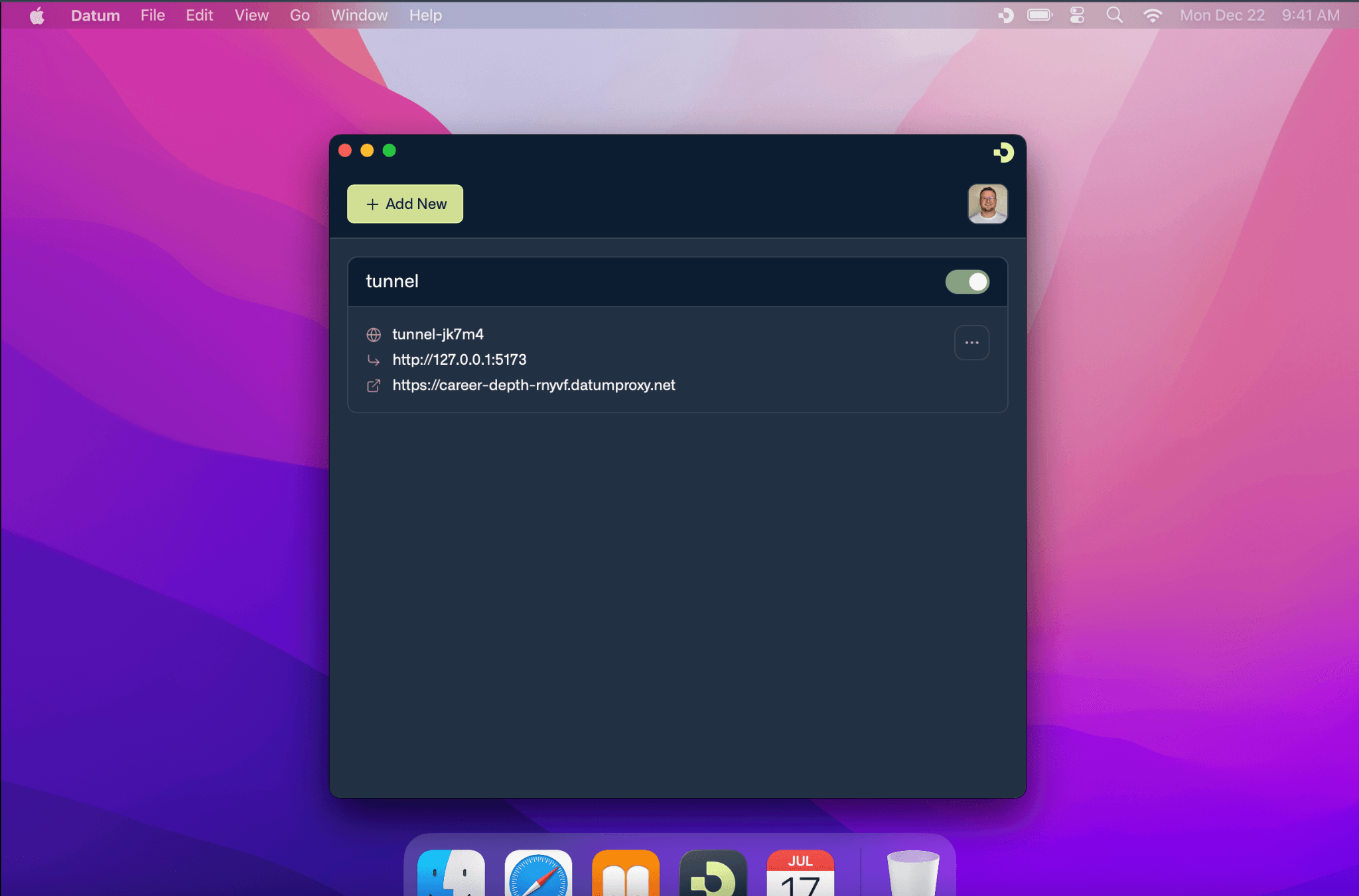
And this is just the start. We want people to experience seamless connectivity from their desktop to the edge — not a patchwork of tools, apps, and services stitched together with hopes and dreams. Desktop is our entry point. True private global connectivity is what comes next.
If you've made it this far, you're probably exactly the kind of person we're looking for to help us kick the tires. Take it for a test drive — we'd love your feedback.