

gVPC is in preview, and the
networking.datumapis.com/v1alpha API can change.How Instances get addresses
Datum assigns all addresses. You don’t choose address ranges or plan subnets. The following table describes each level of the address plan:
In the Cloud Portal, open a network under VPC > Networks to see the address plan for real: the network’s
/48, the /64 for each location, and the /96 for each Instance.
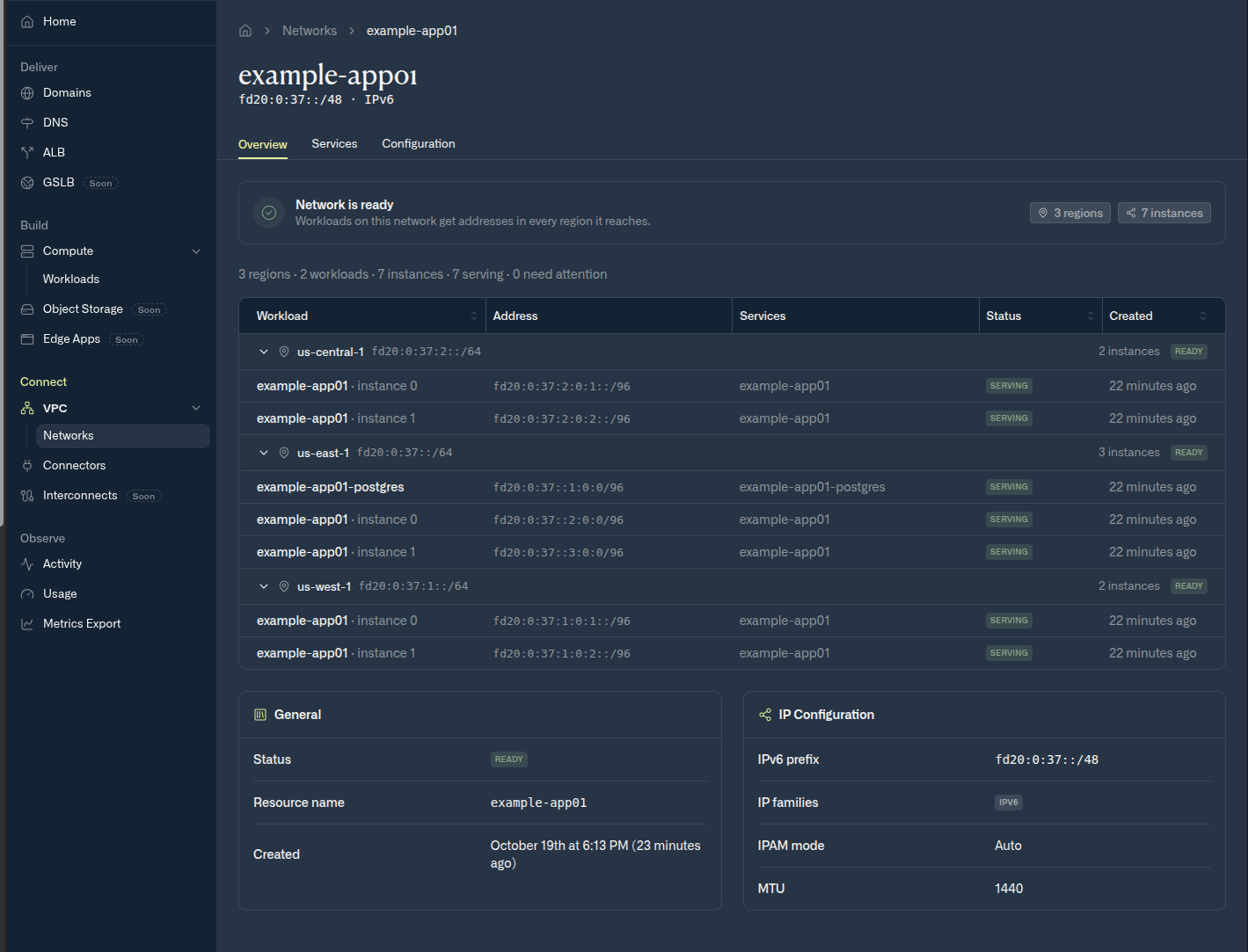
A network's address plan: a /48 for the network, a /64 for each location, and a /96 for each Instance
eth0, and it has IPv6 addresses only. Unique local addresses are private: they aren’t routable on the internet.
To find your Instances’ addresses, run the following command:
WORKLOAD_NAME with the name of your workload.
The INTERNAL IP column shows each Instance’s primary private IPv6 address. For all the addresses on an Instance’s interface, run datumctl compute instances describe INSTANCE_NAME.
What’s next
- To learn which traffic a network carries and how Instances connect, see Traffic and connecting.
- To keep an Instance’s address after scale-down, see Keep addresses after scale-down.