A perk of working at a startup is you get to build things you wish you had at your last job.
I have a running list of things that I’d love to “do right” if given the chance, and most of them are related to underlying systems that started off to solve one problem and then evolved (or devolved!) with workarounds over time. One of those pain points I’ve experienced first hand is the lack of a single source of truth for every service a customer can use.
No surprise, but this is why we built a scalable service catalog for Milo before we strictly needed one. It’s an internal catalog that lets us curate, govern, and share approved solutions for users to discover and deploy. Is that really too much to ask for?
Just like enabling compute.googleapis.com on Google Cloud, a Datum Cloud user enables compute.datumapis.com for their project to provision Compute instances. The catalog automatically propagates that single action to billing, quotas, and the user portal.
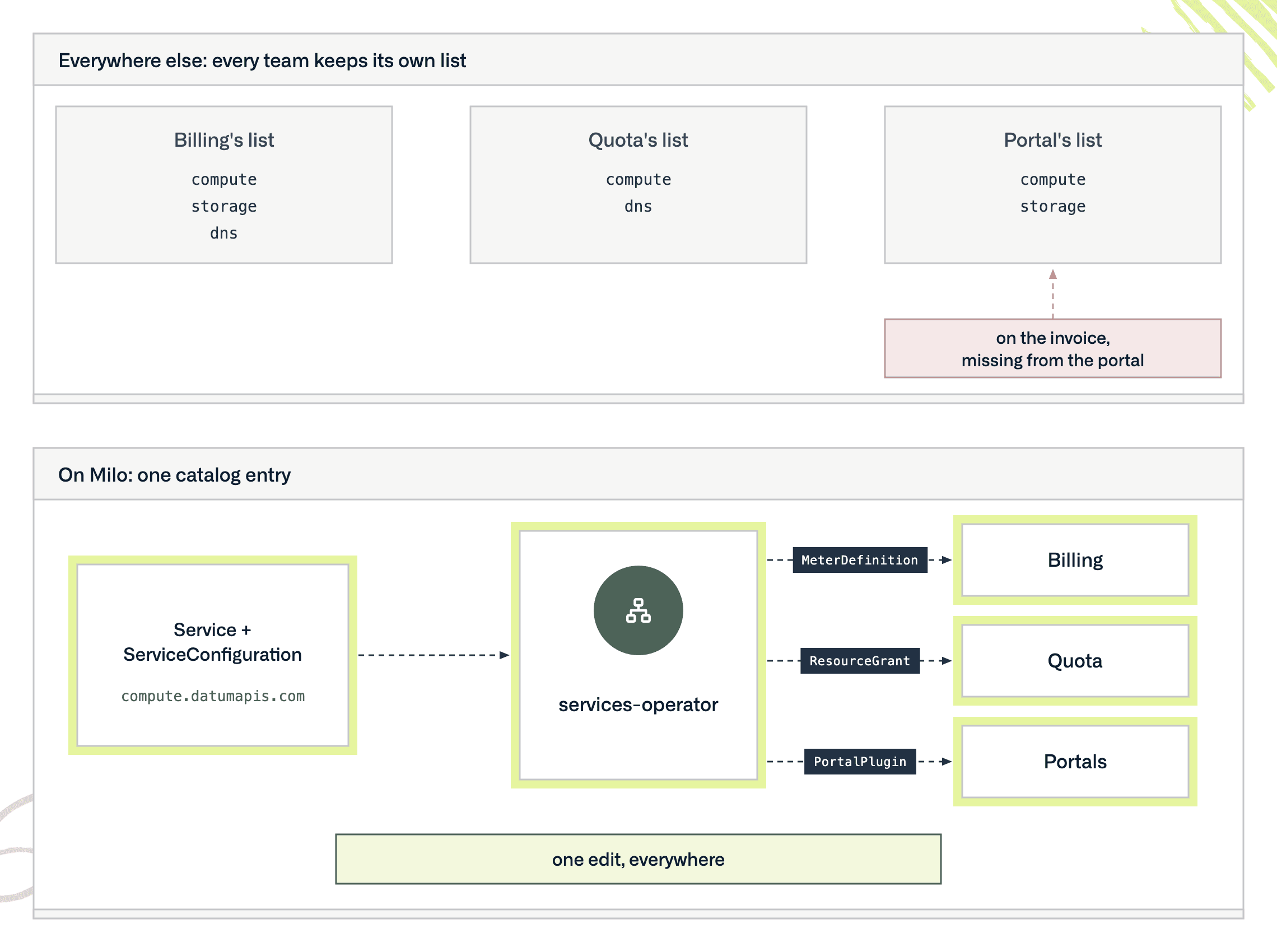
flowchart TB
    subgraph other["everywhere else: every team keeps its own list"]
        direction LR
        b["Billing's list<br/>compute, storage, dns"]:::ext
        q["Quota's list<br/>compute, dns"]:::ext
        p["Portal's list<br/>compute, storage"]:::ext
        miss["on the invoice,<br/>missing from the portal"]:::bad
        b ~~~ q
        q ~~~ p
        miss -.-> p
    end
    subgraph milo["on Milo: one catalog entry, one edit everywhere"]
        direction LR
        svc["Service +<br/>ServiceConfiguration<br/>compute.datumapis.com"]:::datum
        op["services-operator"]:::datum
        bill["Billing"]:::datum
        quota["Quota"]:::datum
        portals["Portals"]:::datum
        svc -.-> op
        op -.->|"MeterDefinition"| bill
        op -.->|"ResourceGrant"| quota
        op -.->|"PortalPlugin"| portals
    end
    other ~~~ milo
    linkStyle 2 stroke:#bf9595
Anatomy of a catalog entry
When we add a new service, everything that describes it is transcribed into a single entry. This will look familiar if you have worked with Kubernetes CRDs.
The Service says what it is; so that the platform can identify it and pull the same information across multiple touchpoints. Here's what the entry for Datum Compute looks like:
apiVersion: services.miloapis.com/v1alpha1kind: Servicemetadata: name: computespec: serviceName: compute.datumapis.com # (1) phase: Published # (2) enablementPolicy: mode: SelfService # (3) dependencies: - serviceRef: name: networking-datumapis-com # (4) # ...- serviceName is the join key. Billing exports, meters, and the portal all key on it.
- phase only moves forward: Draft → Published → Deprecated → Retired. Once a service is Published its name is locked, so a breaking change ships as a new service.
- enablementPolicy decides who gets in. SelfService lets any project turn it on. GatedByProvider makes projects ask for access first.
- dependencies are enabled automatically, all the way down. Turn on Compute and you also get networking, which brings IP address management. You don't need to know either one exists.
The ServiceConfiguration says what it does: what it measures, what it bills, what it limits, and where it shows up. Something like Compute can be quite extensive. If fact, it runs to about 230 lines, so I’ve consolidated it down to share the most interesting bits here:
apiVersion: services.miloapis.com/v1alpha1kind: ServiceConfigurationmetadata:  name: computespec:  serviceRef:    name: compute
  metrics:                  # what the service emits  - name: compute.datumapis.com/instance/milli-cpu-seconds    kind: Cumulative    unit: '{millicore}.s'    dimensions: [runtime_class]  - name: compute.datumapis.com/instances    kind: Gauge        unit: '{instance}'  # ...
  billing:                  # which metrics become meters    consumerDestinations:    - monitoredResourceType: compute.datumapis.com/Instance      metrics:      - compute.datumapis.com/instance/milli-cpu-seconds      # ...
  quota:                    # default limits, per project    limits:    - name: compute-instances      metric: compute.datumapis.com/instances      defaultLimit: 10      # environments can override it    # ... workloads, vCPUs, memory, shell sessions
  userInterface:            # where its portal plugins live    # ...
Each metric is declared once at the top, which is referenced by other services (like billing and quotas) so the information isn’t duplicated.
This makes it pretty painless for a developer to ship a service. They simply write these two files and open a pull request. Because we have a fancy service catalog wired up, they don’t even have to spin up their agents to file separate tickets for billing, quotas, or portal elements.
What reads from the catalog
The catalog is a source of truth, which is the whole point.
Nobody wants to manage five systems that each poll the catalog and interpret it in five slightly different ways. Instead, we have one controller (the services-operator) that watches catalog objects across every project's control plane and writes the objects so the downstream systems can pick them up.
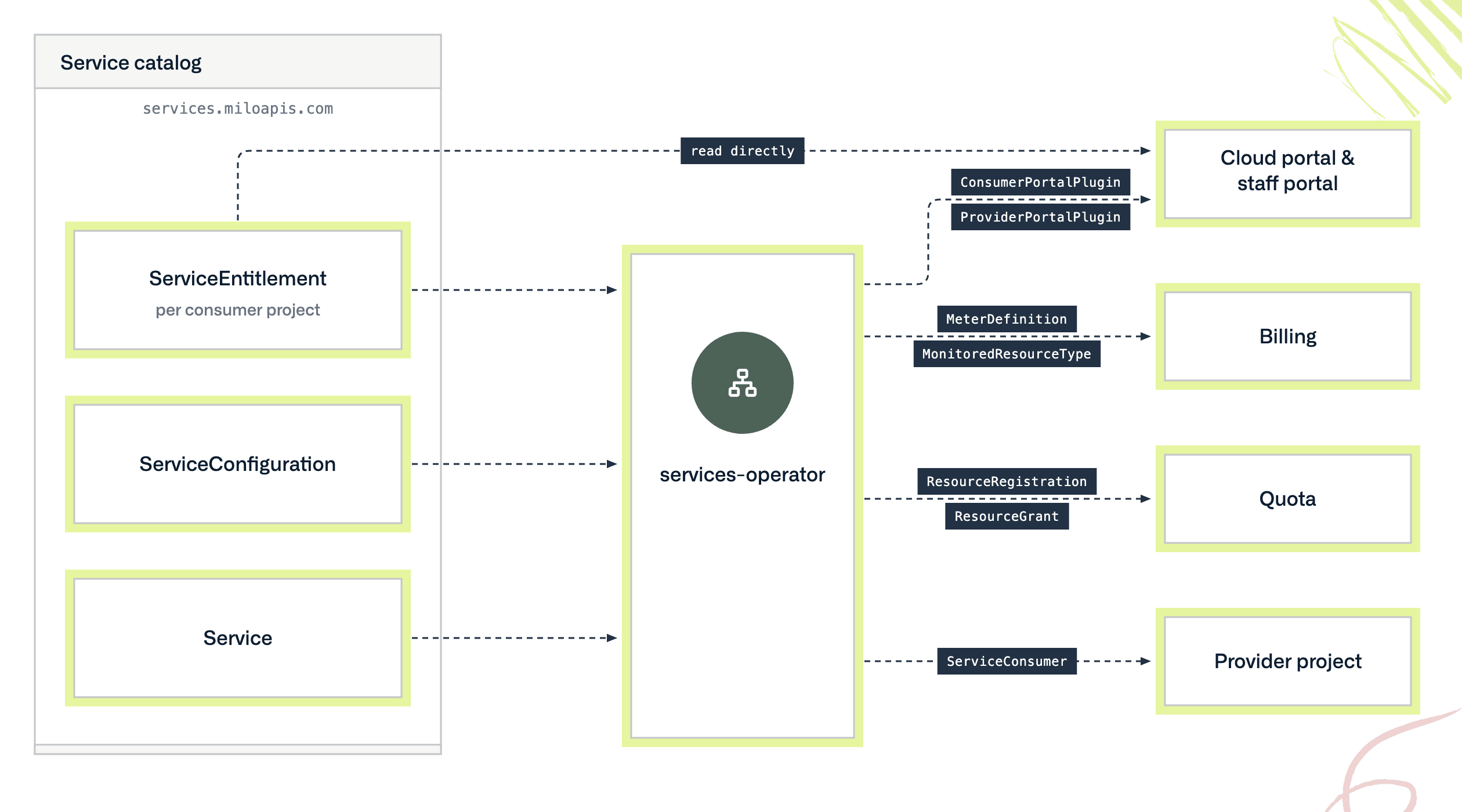
flowchart LR
    subgraph cat["service catalog (services.miloapis.com)"]
        e["ServiceEntitlement<br/>per consumer project"]:::datum
        c["ServiceConfiguration"]:::datum
        s["Service"]:::datum
    end
    op["services-operator"]:::datum
    portal["Cloud portal &<br/>staff portal"]:::datum
    bill["Billing"]:::datum
    quota["Quota"]:::datum
    prov["Provider project"]:::datum
    e -.->|"read directly"| portal
    e -.-> op
    c -.-> op
    s -.-> op
    op -.->|"ConsumerPortalPlugin,<br/>ProviderPortalPlugin"| portal
    op -.->|"MeterDefinition,<br/>MonitoredResourceType"| bill
    op -.->|"ResourceRegistration,<br/>ResourceGrant"| quota
    op -.->|"ServiceConsumer"| prov
- Billing gets a MeterDefinition for each metric routed in billing.consumerDestinations, and a MonitoredResourceType for each resource type the service declares. Billing never imports the catalog. It sees billing objects, the same as it would if a person had written them by hand.
- **Quota **gets a ResourceRegistration for each limit. When a project enables the service, it also gets a ResourceGrant sized to defaultLimit.
- **The portals **(we have both a public cloud and private staff one), get a plugin registration (ConsumerPortalPlugin, ProviderPortalPlugin) pointing at the service's UI bundle. They also read a project's entitlements directly to decide what to show.
- **The provider **gets a ServiceConsumer in its own project for every project that turns the service on.
Under the hood the operator writes all of these with Kubernetes server-side apply. It labels what it wrote and sets owner references, so it can clean up anything it no longer needs.
If we change a limit or add a metric in the ServiceConfiguration, then the changes are reconciled downstream. Disabling a service works the same way: the operator removes its quota grants as well as the provider's ServiceConsumer and anything the service installed (including any dependencies).
The service doesn’t fully shut off until everything is done.
Walkthrough: enabling Compute, end to end
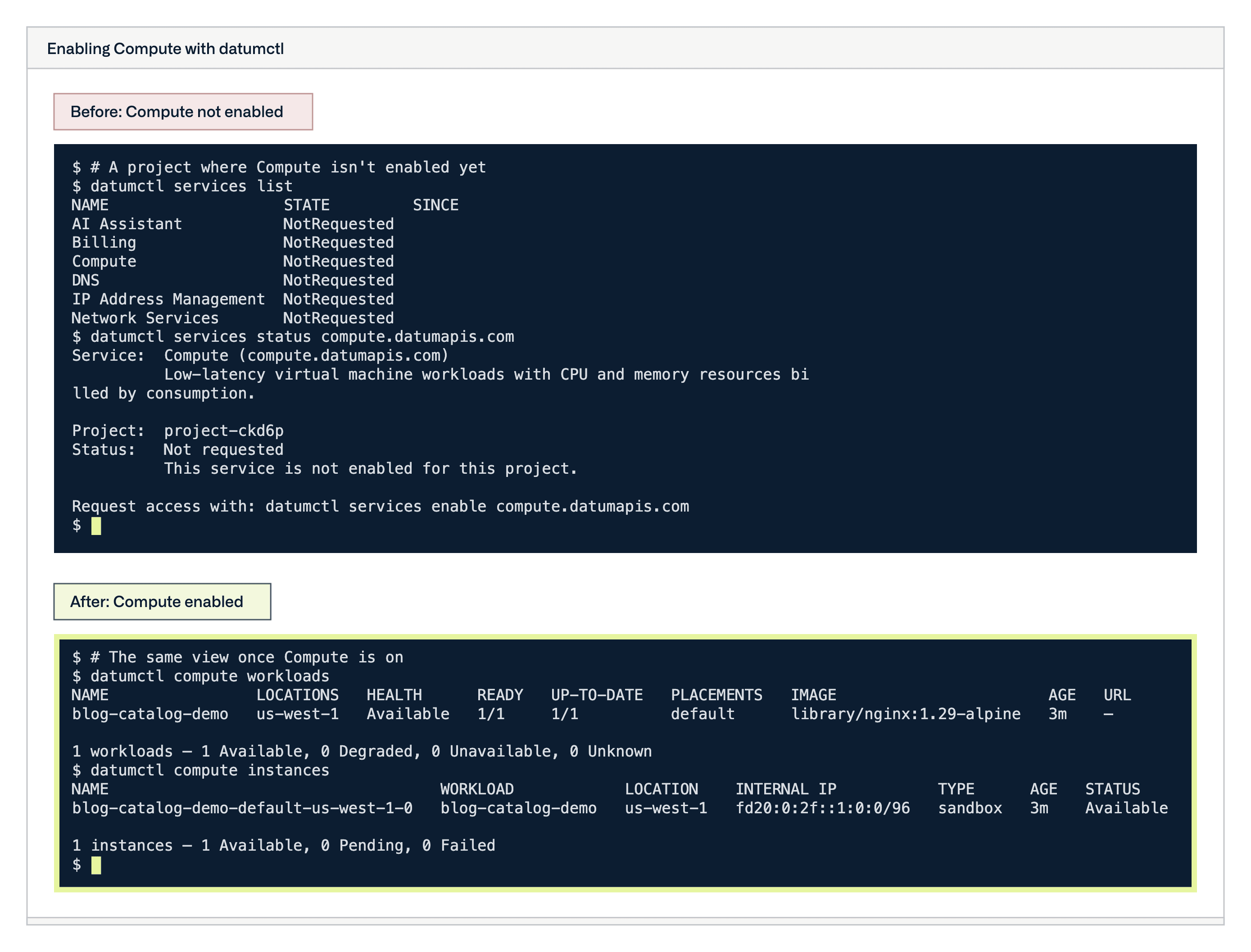
The quickest way to see this fan-out effect is to watch it happen. Here's a brand-new project, before and after its first datumctl services enable:

The customer side deliberately hides the rest. A consumer project doesn’t need access to MeterDefinitions, ResourceRegistrations, or the grants themselves. That’s just platform plumbing. Instead, what reaches the customer is the effect: a quota table, a portal page, a line on an invoice.
How we put self service into practice
There’s no better way to pressure-test functionality than to try it on ourselves. From early June through mid-October 2026, Datum Compute was totally gated, so when a user requested access, it sat in PendingApproval, and our team had to manually approve each one. By tying Compute into our Service Catalog, we were able to make one change when we opened it to everyone in October. (the diff, in config/components/service-catalog/service.yaml):
@@ -13,6 +13,6 @@ spec: producerProjectRef: name: datum-cloud enablementPolicy:- mode: GatedByProvider+ mode: SelfService phase: Published serviceName: compute.datumapis.comThat one line took us from manual approvals to fully automated. Commands that used to file an access request now turn Compute on the first time you run them. Even listing your workloads does it:
$ datumctl compute workloadsEnabling compute for project "project-vqglv"...
Compute is now enabled for project "project-vqglv".No workloads found in project project-vqglv.
Quota, the provider's ServiceConsumer, and the portal all followed through the fan-out.
Plugins: how a service shows up in datumctl
A catalog entry doesn't stop at billing and quota. It also decides where a service appears, and nothing that displays a service keeps its own copy of authentication details, they all simply refer to the catalog.
Starting with the CLI. Each service can ship a datumctl plugin, and register it in its ServiceConfiguration. In the user interface up above, you can see this in action: before it runs a command, it looks up the compute Service in the live catalog, reads its enablement mode, and checks the project's ServiceEntitlement. Here are the steps it takes:
- If the service is SelfService and the project hasn't enabled it, the command enables it.
- If the service is gated, the command takes the access-request path instead.
- If the service already exists, the command does a quick check, and then reports an error rather than turning Compute on.
Once Compute is on, the Compute views show up, backed by the same entitlement the portal checks:
Fan-out to the portals work the same way. The userInterface block in the ServiceConfiguration registers a **consumer **plugin for the cloud portal your customers see, and a provider plugin for the staff portal our team uses. The catalog knows which services are enabled in each project, so the correct UI appears automatically.
Opinionated on purpose
This isn't a general-purpose catalog like ServiceNow (with endless configuration) or an internal developer portal (like Backstage) to track ownership and metadata for services, libraries, and pipelines.
Instead, Milo's catalog is a product catalog for the primitives that clouds need. Things that drive invoices, quotas, and portals and all have to agree. It bakes in three opinions:
- **Names are forever. **Breaking changes become a new service.
- **Projects, not people. **Providers and consumers are both projects, so ownership survives reorgs.
- Declare, don't call. Providers write records, and the operator turns them into effects. No service calls billing's API to register a meter.
We also wanted it to be clear about what it wasn't. It wasn't a runtime, a billing engine, a telemetry pipeline, or IAM. It was meant to declare what exists and leave acting on it to other systems.
It's all open source under AGPLv3, so anyone running their own cloud can use it as well.
Go slow to go fast
A service catalog is a small thing, and it is way less exciting than customer facing features Compute or Galactic VPC. But every service we ship starts as two files and a pull request, and doesn't need a project plan or a bunch of coordination.
It’s that “quietly working in the background” functionality that we hope most people will never notice. It’s also why we’re taking time to build it right from the start. Our future selves will thank us!
- Join the design work at datum-cloud/enhancements
- Read the code: milo-os/service-catalog. Start with docs/overview.md, then the Compute entry for a real example.
- Try it: sign up for Datum Cloud, then run datumctl services list to see what your project can use, and datumctl services enable compute.datumapis.com to see what shows up.