

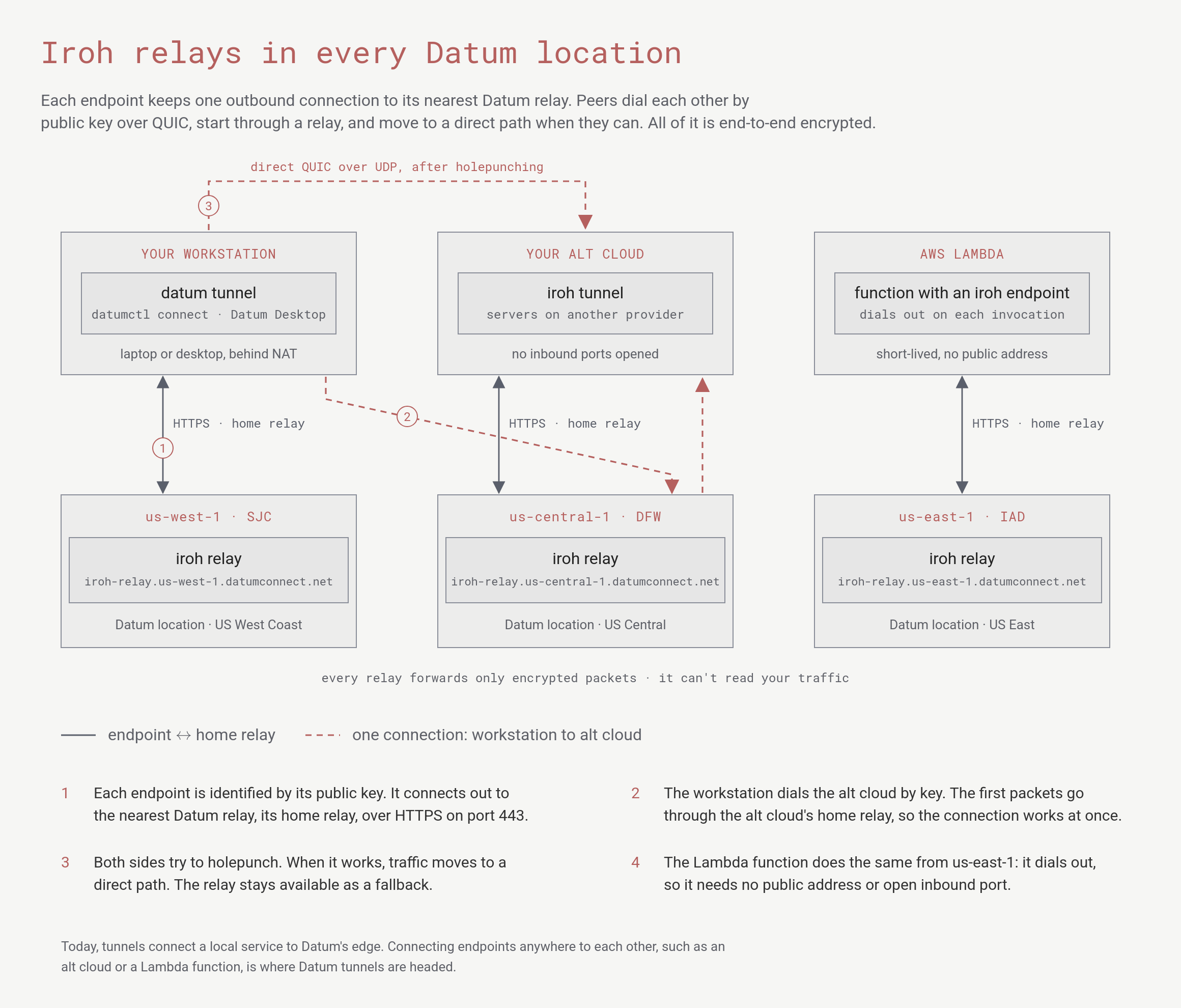
A workstation, an alt cloud and an AWS Lambda function each connect out to the relay in their nearest Datum location. The workstation reaches the alt cloud through the alt cloud's relay first, then directly.
What a relay does
Every Iroh endpoint has a key pair, and its public key is its address. Endpoints dial each other by key, not by IP address, so a connection keeps working when a laptop changes networks or a server moves. A relay does three things for the endpoints that use it:- Gives every endpoint a home. Each endpoint keeps one outbound connection to its nearest relay, its home relay, over HTTPS on port 443. Because the connection is outbound, the endpoint needs no public address and no open inbound port.
- Makes the first connection work at once. When one endpoint dials another, the first packets go through the other endpoint’s home relay. The connection works right away, whatever NAT or firewall is in the way.
- Helps the endpoints go direct. While traffic flows through the relay, both sides try to holepunch a direct UDP path. When that works, traffic moves to the direct path, and the relay stays available as a fallback.
Why QUIC
QUIC is the transport under HTTP/3. Iroh uses it for every connection between endpoints because it gives tunnels:- Encryption by default. TLS 1.3 is part of the protocol, not a layer on top.
- Many streams on one connection. Requests share a connection without one slow request blocking the others.
- Connections that survive network changes. A connection can move between paths, such as from relayed to direct, or from Wi-Fi to cellular, without starting over.
- UDP underneath. UDP is what makes holepunching through NAT possible.
Where relays run
Datum runs an Iroh relay in each of these locations:
More locations will run relays as Datum grows. For every Datum location, see Locations.
To check that a relay is up from your network, request its health endpoint:
{"status":"ok", ...} with its version.
How tunnels use the relays
When you start a tunnel, the tunnel agent picks its relays for you. It starts from Datum’s list of relays, measures the latency to each one, and keeps the closest. You don’t configure a relay to use a tunnel. Tunnels are managed with theconnect plugin, which is in preview. It isn’t in the official catalog yet, so install it from GitHub:
The first
serve walks you through setup: it starts the daemon, uses your datumctl login, and enrolls the device in your current project. To enroll without sharing anything, or to reconnect later, run datumctl connect up. On a server without a browser, pass a service account’s credentials with datumctl connect up --credentials-file PATH.
Connectors find each other by name or public key, never by IP address. dial opens a port on your own machine, so in the example above, ssh -p 2222 localhost reaches the other Connector’s SSH server through the tunnel, directly or through a relay.
Public traffic reaches a --public service through Datum’s edge. A request arrives at an Application Load Balancer, and Datum’s Iroh gateway forwards it to your Connector by its endpoint ID. Your service answers on localhost, and nothing on your machine is exposed to the internet. The Desktop Apps use the same tunnels.
To pin a tunnel to specific relays, for example while you troubleshoot, set
DATUM_CONNECT_RELAY_URLS to a comma-separated list of relay URLs before you start the daemon.Where this is going
Iroh connects any two endpoints, wherever they run. With theconnect plugin, a workstation can already reach a service on another Connector by key, and a device can join a gVPC network. Datum’s relays are built to grow that further: servers in an alt cloud and short-lived functions, such as on AWS Lambda, reaching your network and each other with no public addresses or open ports.
This section describes where Datum is headed. Plans can change, and this isn’t a commitment to deliver any feature or to meet any timeline.
What’s next
Tunnels
Datum’s Iroh-powered Connector.
Desktop Apps
Expose a local environment to the internet over a tunnel.
Locations
Every Datum location and region.
Platform roadmap
See what Datum is building now and what comes next.