

The Galactic stack
Galactic has four layers. Kubernetes resources describe every layer, so the whole network is configured the same way the rest of Datum is.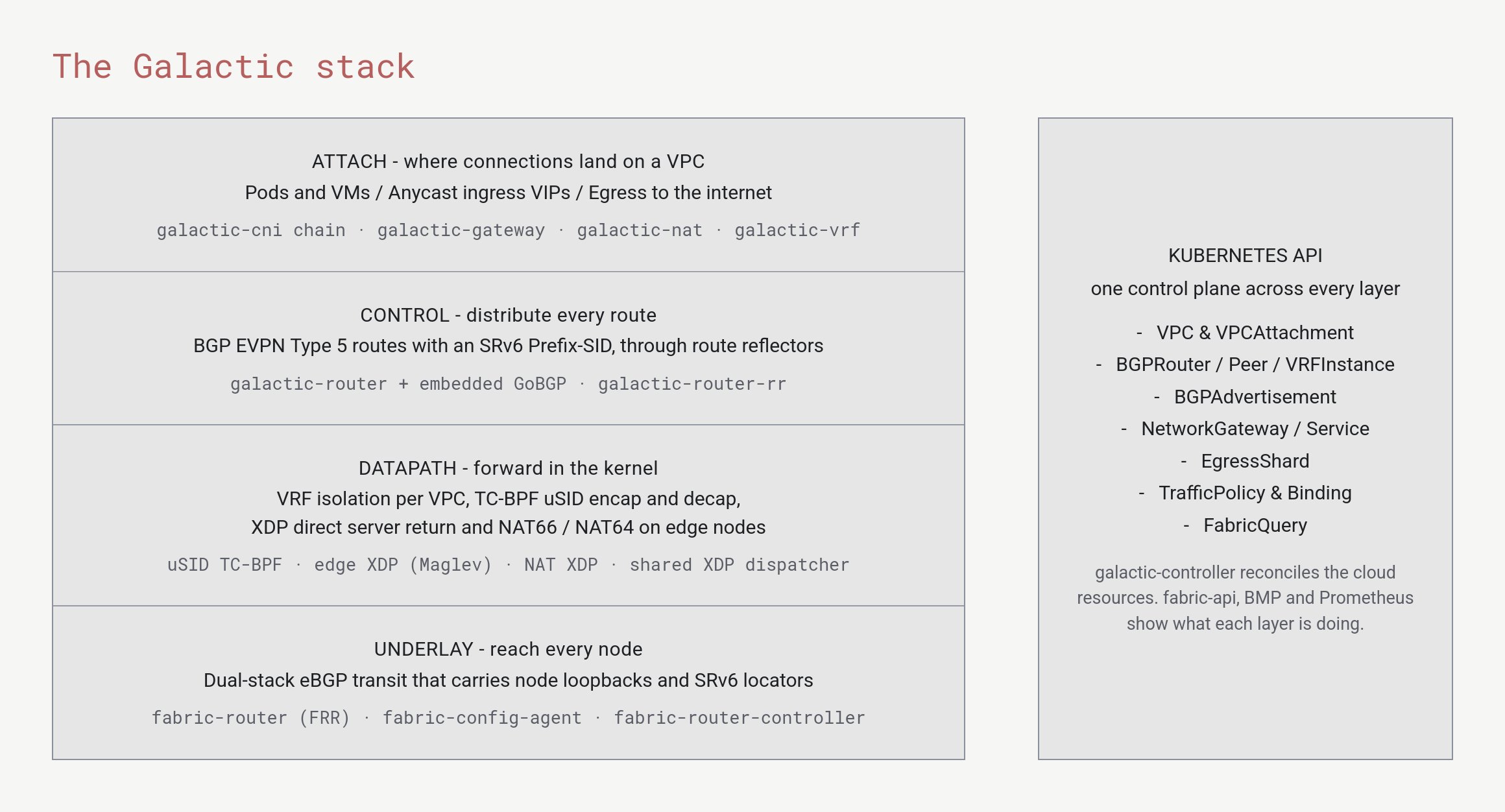
Galactic's four layers, and the Kubernetes resources that configure them
How a connection works
When something attaches to a network, Galactic gives it an address and tells every other node in that network how to reach it. The following figure follows one attachment from start to finish.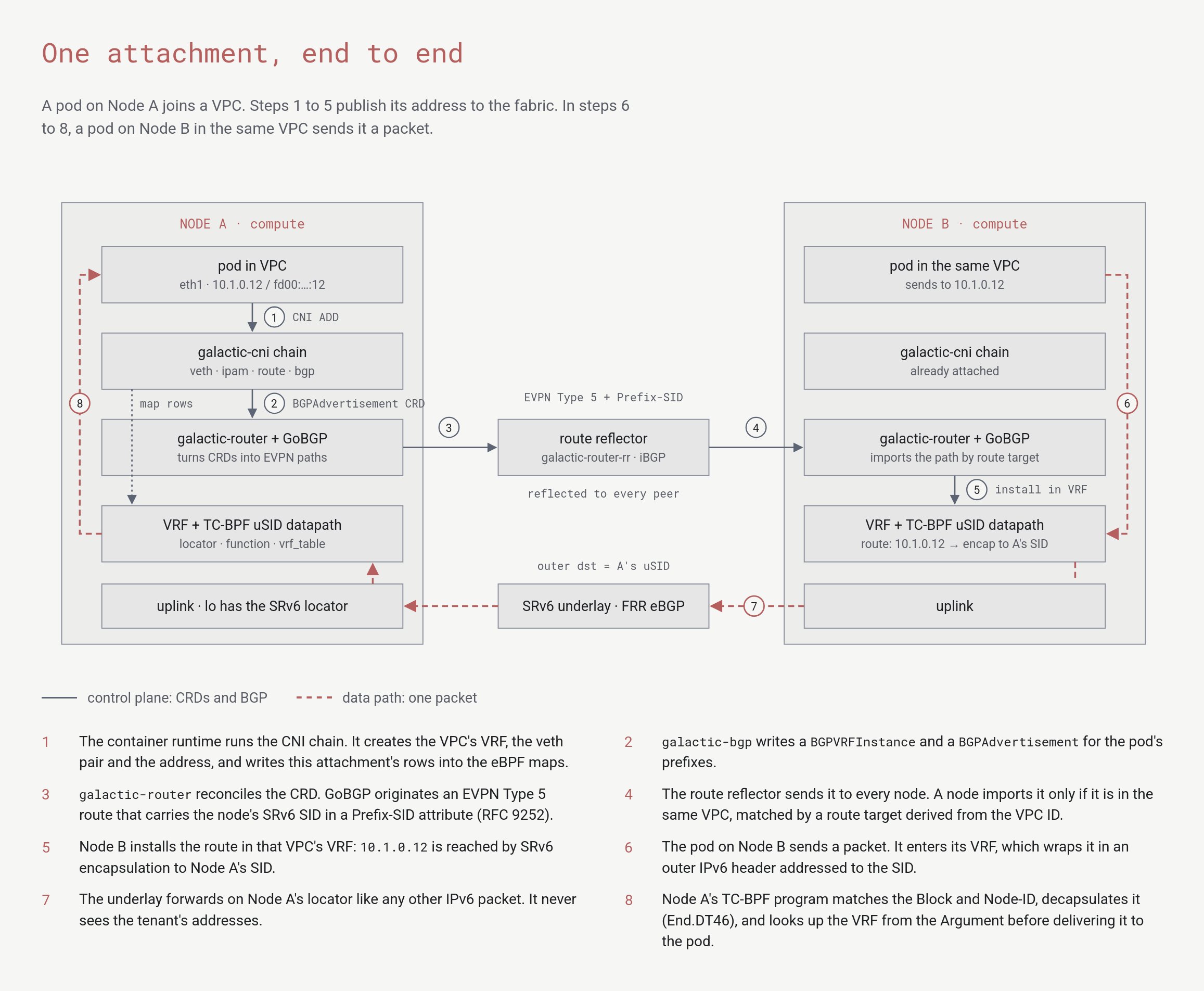
Steps 1 to 5 publish a new attachment's address. Steps 6 to 8 deliver a packet to it from another node.
- The attach plugins create the node’s side of the connection. They place it in the network’s own routing table (a VRF) and register it with the node’s eBPF datapath.
- They record the new address as a
BGPAdvertisementresource. - The node’s router turns that resource into a BGP EVPN route. The route carries the node’s SRv6 address for this network.
- Route reflectors pass the route to every node. Only nodes that host the same network import it.
- Those nodes install the route in their copy of the network’s routing table.
- When a workload sends a packet, its node wraps the packet in an outer IPv6 header addressed to the destination node’s SRv6 address.
- The backbone forwards the wrapped packet like any other IPv6 packet. It never sees your network’s addresses.
- The destination node’s eBPF program unwraps the packet and hands it to the right network’s routing table, which delivers it.
The address carries the instructions
Each SRv6 address that Galactic uses tells the network where the packet goes, what to do when it gets there, and which private network it belongs to.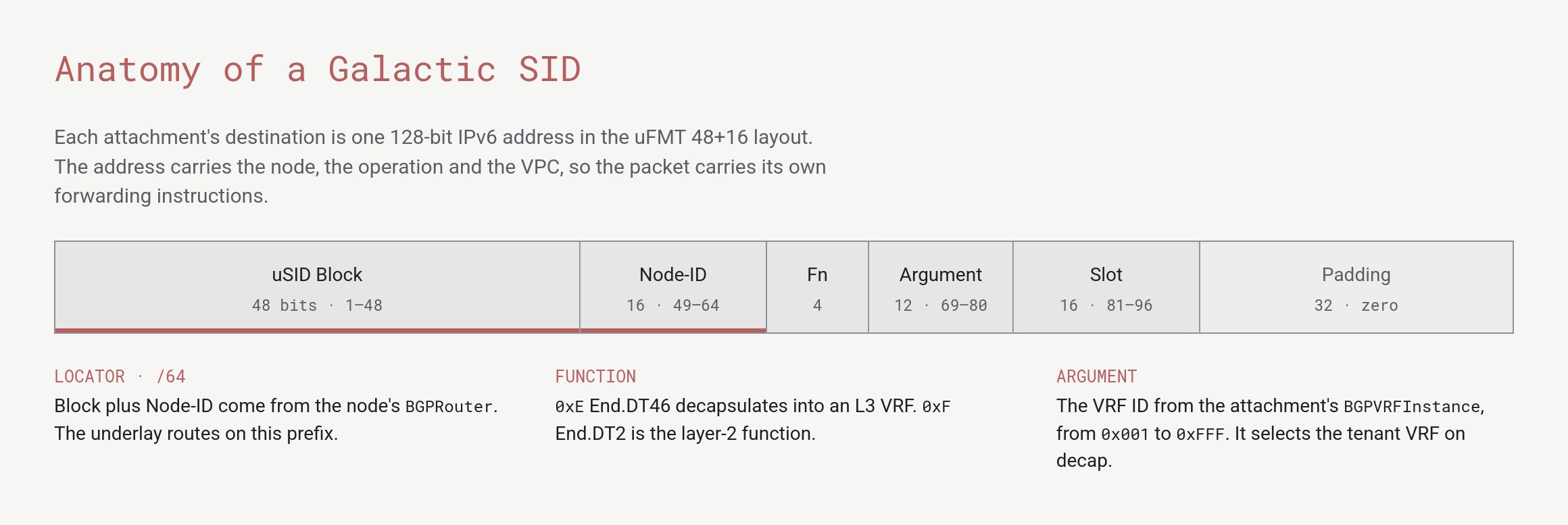
The 128-bit layout of a Galactic SRv6 address
- Block and Node-ID identify the destination node. The backbone routes on this 64-bit prefix only.
- Function says what the node does with the packet, such as unwrapping it into a private network.
- Argument identifies which private network on that node receives the packet.
How Datum runs Galactic as a service
gVPC is Galactic run as a managed service. You work with a small set of resources, such as a network and the workloads attached to it. Datum operates everything else. What Datum runs for you:- The backbone. Datum runs the underlay routers in every location, the routes between locations, and the configuration of each router. Configuration changes roll out through the API in stages, so a bad change can be stopped before it reaches the whole fleet.
- The routing control plane. Every node runs a Galactic router. Datum runs the route reflectors that connect them, so a new attachment becomes reachable from every location without anyone touching a router.
- The edges. Datum runs the edge nodes that bring public traffic into a network, through the Application Load Balancer and anycast ingress addresses. They also take traffic out to the internet.
- Identity and addressing. Datum allocates network identities and address space centrally, so two networks never collide. This is why you don’t plan subnets.
- Visibility. Datum monitors every BGP session, route and datapath counter. Its operators can ask any router for its view of the network, and can run ping and traceroute from inside the backbone.
- Create a network.
- Attach things to it.
One network, many attachments
This section describes where gVPC is headed. Only the attachments marked Available below work today. Plans can change, and this isn’t a commitment to deliver any feature or to meet any timeline.
BGPAdvertisement. A container, a virtual machine, a public ingress address and an internet egress point already join this way. The rest of the network doesn’t need to know what kind of thing an attachment is.
So adding a new kind of connection doesn’t need a new network. It needs a new way to attach. That makes a gVPC network work like a virtual meet-me room: a single private place where all your connections meet, whatever they are and wherever they come from.
Words we use for this
These terms describe gVPC in plain language. Each one corresponds to something the platform does.What’s next
gVPC
Create a network and attach workloads to it.
Traffic and connecting
Learn which traffic a network carries today.
Networking roadmap
Review what gVPC can’t do yet and what’s planned.
Galactic on GitHub
Read the source code and architecture documents.