

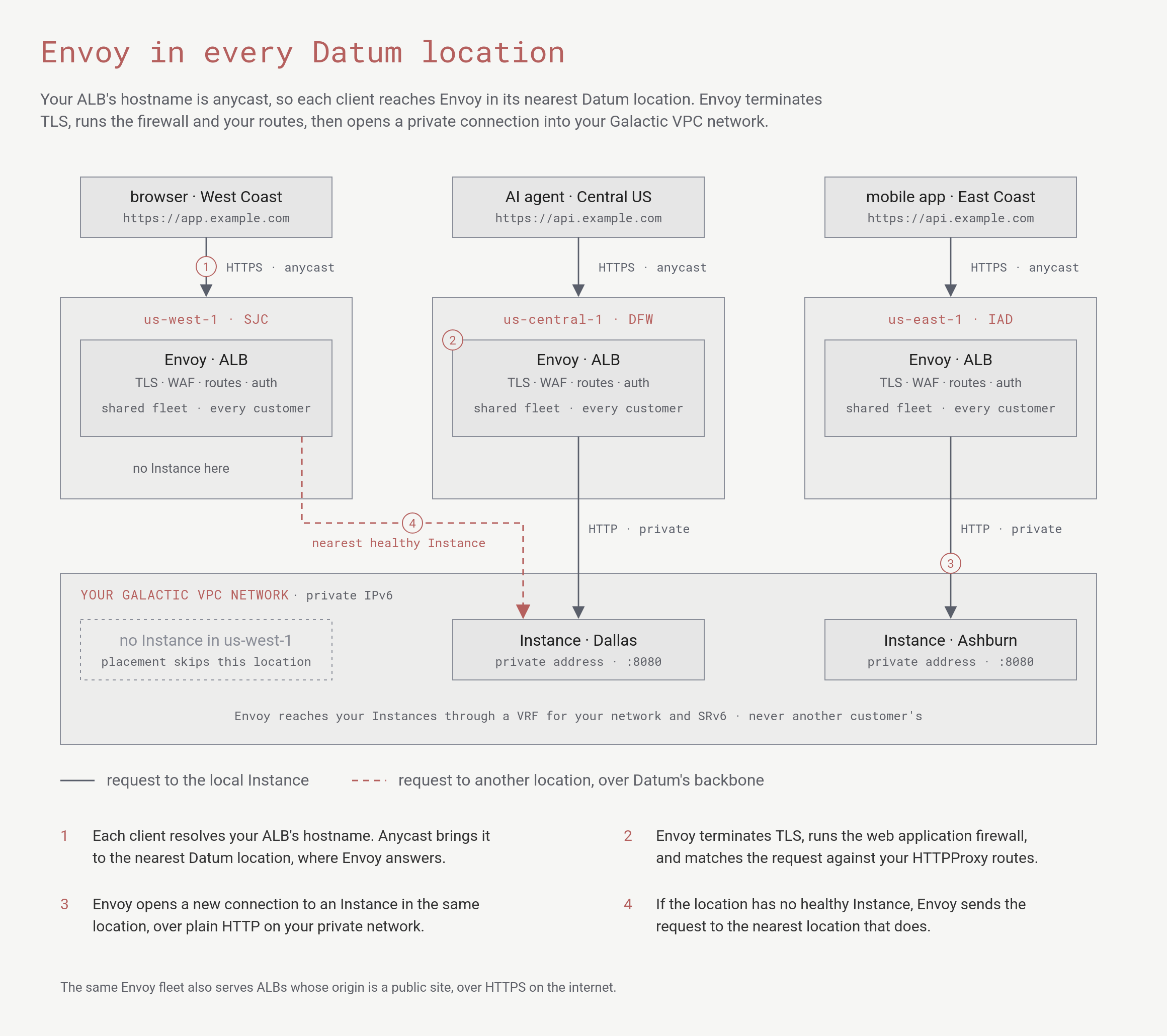
Clients reach Envoy in their nearest Datum location. Envoy serves each request from an Instance in the same location, or from the nearest location that has one.
How Datum runs Envoy
Datum runs Envoy as a shared fleet, deployed in every Datum location:- One fleet, every customer. Every location runs a pool of Envoy proxies that serves the ALBs of every customer at once. Datum doesn’t run a separate proxy for each ALB, so creating an ALB doesn’t wait for new infrastructure to start.
- Close to your users. ALB hostnames are anycast. A client’s request arrives at the nearest Datum location, and Envoy in that location terminates TLS and handles it. To see which location you reach, visit edge.datum.net.
- Scales with the network. Each new Datum location adds Envoy capacity close to the users it serves, and Datum adds proxies within a location as traffic grows. You don’t size, place or scale a load balancer yourself.
- Configured centrally. You declare an ALB once, in your project. Datum’s network services operator turns your resources into Gateway API resources, and Envoy Gateway pushes the resulting configuration to Envoy in every location.
Into your private network
Envoy is how public traffic reaches your Compute Instances, which have private addresses only on your gVPC network. For each request, Envoy opens a new connection to a healthy Instance, preferring one in the same location. If the location has no healthy Instance, Envoy sends the request to the nearest location that has one, over Datum’s backbone. Datum terminates TLS at Envoy and connects to your Instances over plain HTTP on your private network. For how to publish a workload, see Compute and ALB. Because the fleet is shared, Envoy must never confuse your network with another customer’s, even when both use the same private addresses. Datum handles this below Envoy, in the Galactic network:- On each Envoy node, a sidecar keeps a Linux VRF, a separate routing table, for each customer network that Envoy connects to.
- When Envoy connects to one of your Instances, its connection is bound to your network’s VRF. The packet leaves the node wrapped in an SRv6 header that identifies your network.
- On the Instance’s node, Datum unwraps the packet into your network’s routing table only, and delivers it.
Where Envoy fits
When you create an ALB, you describe what you want with Datum resources, and Datum’s network services operator turns them into Envoy configuration:- HTTPProxy is the main resource you write: hostnames, routes, origins, redirects, rewrites, and header changes. Datum’s operator turns it into a Gateway API
GatewayandHTTPRoute, and Envoy Gateway programs Envoy from them. - TrafficProtectionPolicy adds the Coraza web application firewall with the OWASP Core Rule Set, which runs inside Envoy. It inspects requests before they reach your origin and responses before they leave Datum for the client (outbound traffic).
- Certificates and DNS for the ALB’s hostnames are managed by Datum alongside the Envoy configuration.
What Envoy gives you
Envoy handles the protocols and traffic features of the ALB, including:- HTTP/1.1, HTTP/2, gRPC, and WebSockets.
- TLS termination, with certificates that Datum issues and renews.
- Path, header, and query matching, with weighted traffic across several origins.
- Redirects, URL rewrites, and request and response header changes.
- Access logs for every request, including the ones the firewall blocks. See ALB observability.
Using Envoy Gateway resources directly
Some advanced features use Envoy Gateway resources (gateway.envoyproxy.io/v1alpha1) that you apply to your project with datumctl, alongside your HTTPProxy:
Because these are standard Envoy Gateway and Gateway API resources, the upstream Envoy Gateway documentation is a useful reference. Not every upstream feature is available on Datum, so start from the Datum guides.
Related
- ALB overview
- HTTPProxy
- Platform API — why Datum’s platform and APIs are built on Kubernetes.
- Galactic — the network underneath gVPC.
- Iroh Relays — how tunnels reach Datum’s edge.