
For years I’ve relied on a simple nginx config. Whenever I get going with a new laptop, VM or platform and need to listen to a port, I drop it on.
While coming up to speed on Datum Compute, I dropped in my trusty nginx boilerplate and immediately ran into a 503. This was confusing, especially since Datum’s dashboard said everything was healthy!
$ datumctl compute workloadsNAME                LOCATIONS   HEALTH      READY   URLblog-nginx-legacy   us-west-1   Available   1/1     https://cafe-return-32nvn.datumproxy.net
$ curl -s -o /dev/null -w 'HTTP %{http_code}\n' https://cafe-return-32nvn.datumproxy.net/HTTP 503
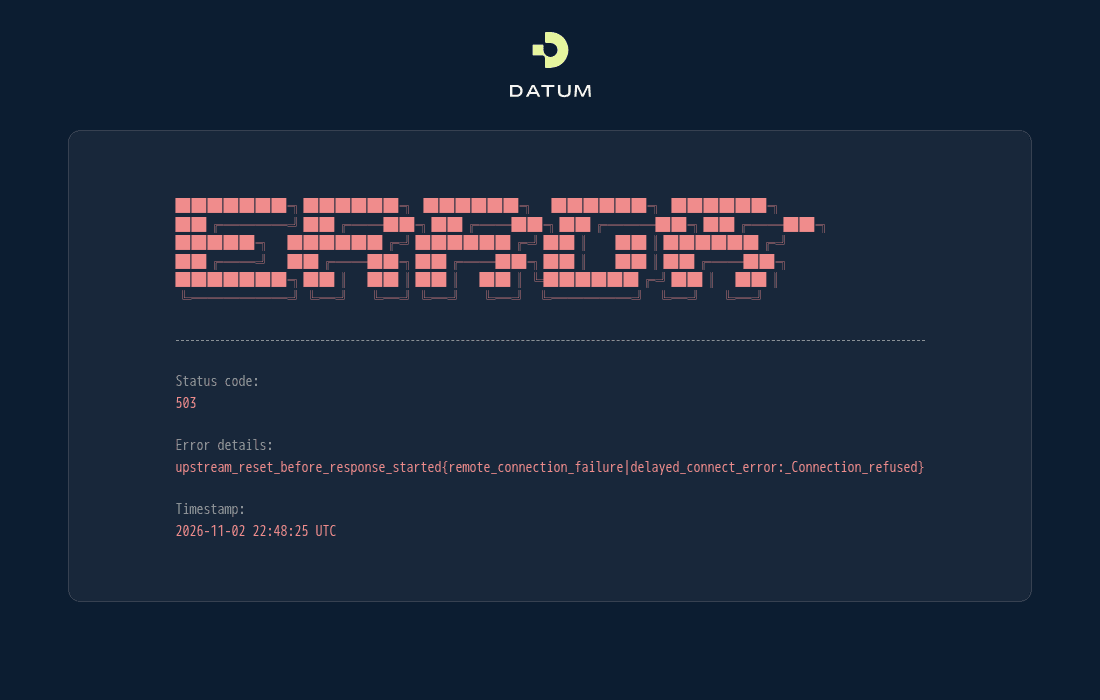
Evidently, I’d run straight into a feature, not a bug.
That’s because Datum is an IPv6 native platform. To really understand Datum, I needed to understand the fundamentals of IPv6. Along the way, I compared Datum Compute to other platforms that I use regularly, including Fly.io, Railway, Google Cloud, Vultr and Podman, and compared IPv6 semantics across them.
Note: each section below ends with a short "IPv6 fundamental" note and a command you can run.
1. "IPv6-native" meant auditing my IPv4 cruft
To see why, let’s start with what an instance actually has.
Each Datum Compute instance gets exactly one address: a private IPv6 address (a ULA, out of fd00::/8, IPv6's answer to 10.0.0.0/8).
There is no IPv4 address and no IPv4 route. It isn't dual stack and IPv6 isn't optional.
# inside the us-west-1 instance$ ip -brief addresslo     UNKNOWN   127.0.0.1/8 ::1/128eth0   UP        fd20:0:53::1:0:0/96 fe80::a1:feff:fee1:2eec/64
$ ip -4 route | wc -l0
As a result, nginx's listen 8080; binds 0.0.0.0 which is an IPv4 address the instance doesn't have. The load balancer, connecting over IPv6, finds nothing listening. Happily, the fix is a single line:
server { listen 8080;+ listen [::]:8080; location / { return 200 "fixed nginx answered\n"; } }Heads up: the official nginx image adds that line automatically, but only to its own default config.
Mount your own config, as most deployments do, and you're back to IPv4-only. No other platform I tested would have shown it, because Datum is the only one where instances are IPv6-only.
Google Cloud, Vultr and Podman started out IPv4 and added IPv6 later, as an opt-in.
Fly.io and Railway built their private networks on IPv6, but still give every machine an IPv4 address alongside it.
Even Google Cloud's IPv6-only VMs keep a link-local IPv4 address for their metadata service. Podman (running locally on my desk) "helpfully" added an IPv4 subnet when I asked it for an IPv6-only network.
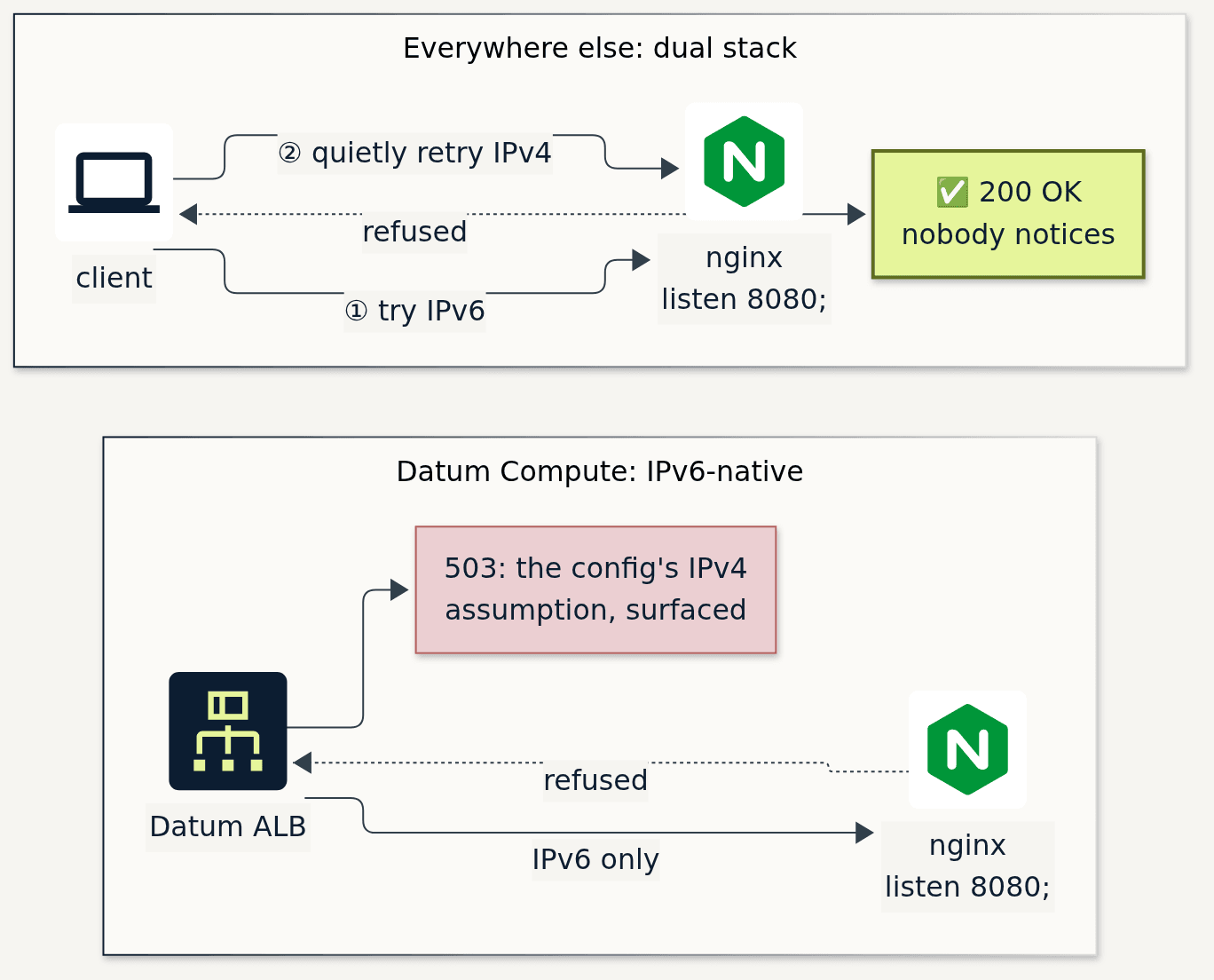
This discovery pushed me to look for the IPv4 assumptions in my own boilerplate, which turned out to be a good exercise!

$ grep -rnE 'listen +[0-9]+;|0\.0\.0\.0|169\.254\.169\.254|\b8\.8\.8\.8\b|1\.1\.1\.1|preferIPv4Stack' suitcase/nginx.conf:3: listen 8080;compose.yaml:4: command: ["gunicorn", "--bind", "0.0.0.0:8000", "app:wsgi"]compose.yaml:6: UPSTREAM_DNS: "8.8.8.8"compose.yaml:7: JAVA_TOOL_OPTIONS: "-Djava.net.preferIPv4Stack=true"healthcheck.sh:3: ping -c1 -W2 1.1.1.1 … curl http://169.254.169.254/latest/meta-data/…server.js:3: app.listen(3000, '0.0.0.0');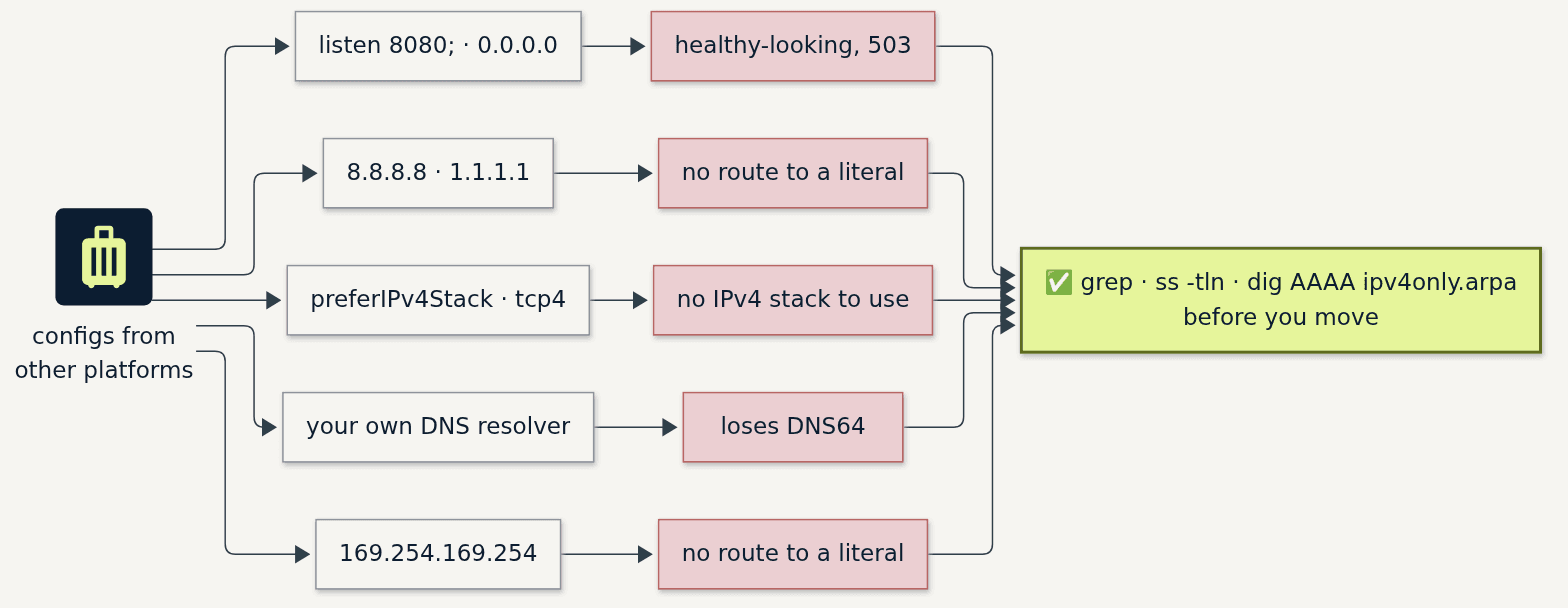
Boilerplate updates
| Cruft | What happens on Datum | How I know |
|---|---|---|
Listening on IPv4 only (listen 80;, 0.0.0.0, --host 0.0.0.0) | Healthy-looking, unreachable: ALB 503 | Tested |
Literal IPv4 addresses (8.8.8.8, 1.1.1.1, upstreams by IP) | No route; NAT64 needs a name (section 5) | Tested |
Forcing IPv4 (curl -4, preferIPv4Stack, Go "tcp4", Node family: 4) | Fails at once: there's no IPv4 stack | Tested (curl -4); same mechanism |
| Bringing your own DNS resolver | Loses DNS64 (section 5), so IPv4-only names stop working | Inferred from the resolver setup |
| IPv4-shaped allowlists and logs | Every peer is the ALB's fd42:…; the client is in X-Forwarded-For | Tested |
| Calling another app by its public URL | From inside an instance, use the private address instead | Tested |
Datum’s platform pushes your app to be IPv6-native. This has incredible value, including forcing you to revisit stale assumptions and old patterns buried in your code.
IPv6 fundamental: 0.0.0.0 and [::] are both "any address", one per family
0.0.0.0 means every IPv4 address on the host; [::] (the "unspecified address") means every IPv6 address.
The fun part: on Linux, a socket on [::] also accepts IPv4 by default, and the IPv4 client shows up as an IPv4-mapped address.
A test listener on my desk reported an IPv4 client as [::ffff:a59:30b], which is 10.89.3.11 in disguise.
nginx turns that behavior off for its [::] listeners by default, which is why listen [::]:8080 ipv6only=off; is the one-line way to cover both families.
Try it: ss -tln inside your instance, which spells it out better than netstat does (netstat shows :::8080 either way).
ss shows | Accepts |
|---|---|
0.0.0.0:8080 | IPv4 only |
[::]:8080 | IPv6 only (what nginx's listen [::]:8080; gives you) |
*:8080 | Both families (a plain Linux socket on [::]) |
On Datum, [::] or * will do; 0.0.0.0 won't.
2. One network, every metro, nothing to plan
Wanting to understand how networks and subnets scale across metros at Datum, I deployed instances in us-west-1, us-central-1 and us-east-1 and looked at what it took for them to talk to each other privately.
Datum's network is called Galactic VPC ("gVPC" for short). This is an implementation of the open-source "Galactic" project, built on IPv6-native Segment Routing. (Segment Routing comes up again in section 3, where it explains a "hop count" rabbit hole I explored).
On Datum, creating private connectivity was simple: just create the gVPC network. The network gets a /48, each location gets a /64 out of it, and each instance gets a /96, all assigned by the platform:
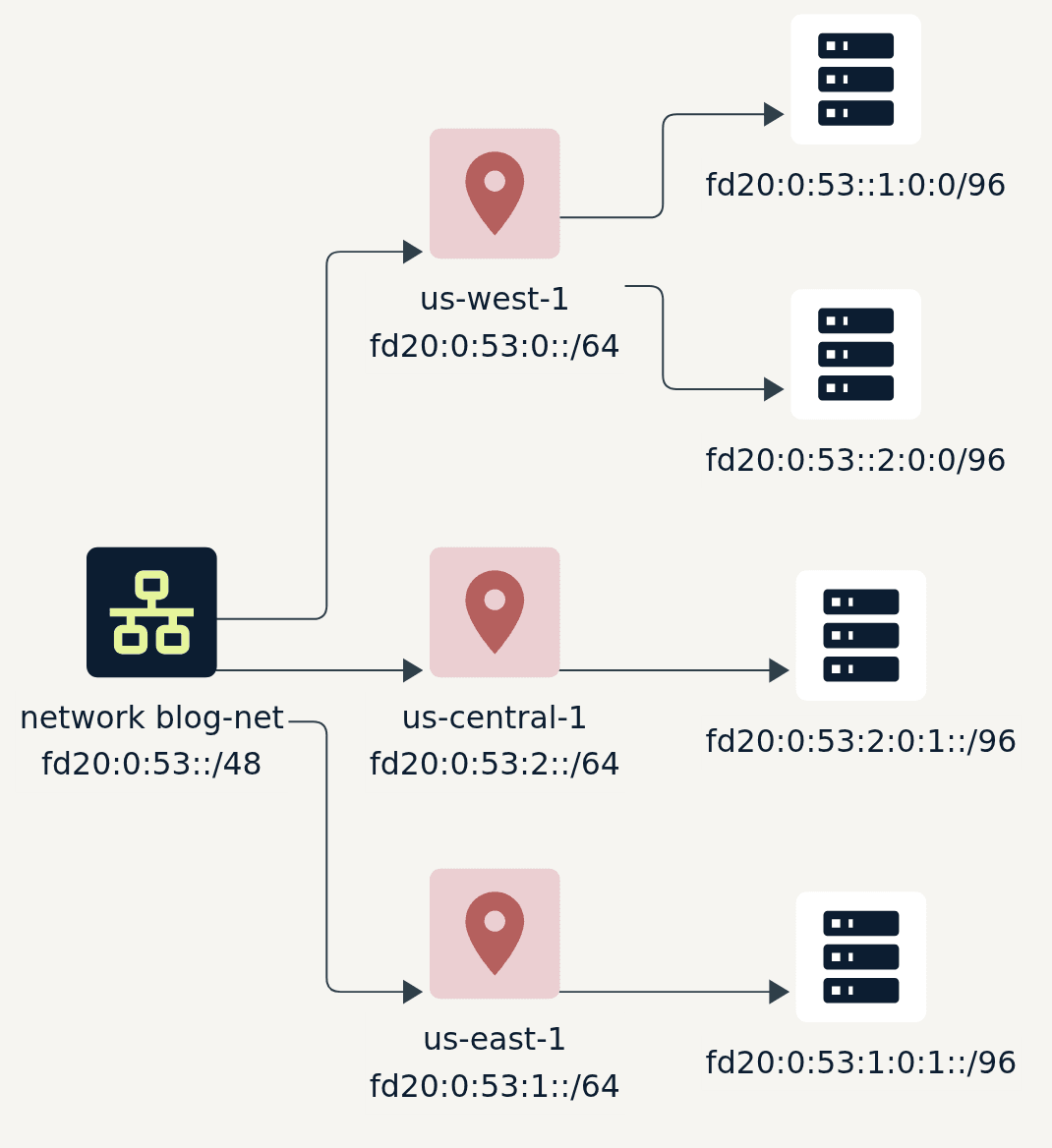

Fly.io and Railway also give you a private network across regions automatically. To compare, I looked at the same west-to-east path from inside an instance on each platform.
These are from my tests on 2026-11-02 (instance sizes differed, so I left throughput out):
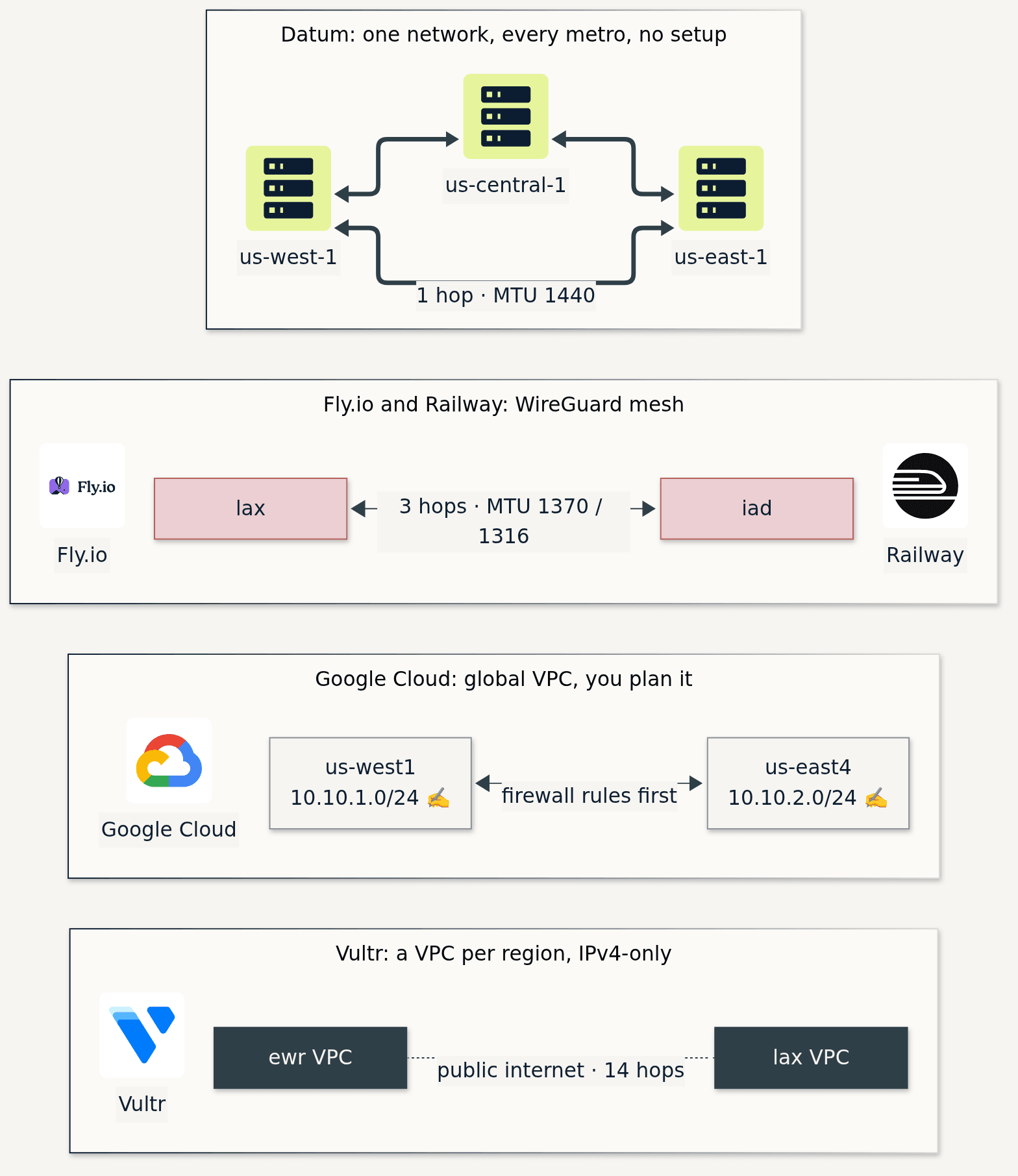
| Platform | Private across regions? | What I set up first | West → east, from inside |
|---|---|---|---|
| Datum Compute | Yes, automatically | Nothing | 1 hop, MTU 1440, 63 ms |
| Fly.io | Yes, automatically (WireGuard) | Nothing | 3 hops, path MTU 1370 (the interface says 1420) |
| Railway | Yes, automatically (WireGuard) | Nothing, but IPv6 egress was off until I turned it on | 3 hops, MTU 1316 |
| Google Cloud | Yes, a global VPC | A custom VPC, an IPv4 CIDR per region, firewall rules | 1460 MTU, hops hidden |
| Vultr | No: one VPC per region, IPv4-only | My own VPN, or the public internet | 14 public hops through a transit provider |
IPv6 fundamental: reading an address, and its prefix
An IPv6 address is 128 bits, written as eight groups of 16 bits (hex digits, separated by colons).
Leading zeros in a group can be dropped, and one run of all-zero groups can be squashed to :: (RFC 5952 is the style guide for writing them).
So my instance's fd20:0:53::1:0:0 is really fd20:0000:0053:0000:0000:0001:0000:0000.
The prefix length says how many bits, from the left, are "the network": the first three groups (/48) are blog-net, the fourth (/64) is us-west-1, and the next two (/96) are this instance.
That leaves room for 65,536 locations per network, and 4.3 billion instances per location, each with 4.3 billion addresses of its own.
And fd00::/8 is the private ULA range, never routed on the internet.
Try it:
python3 -c "import ipaddress; print(ipaddress.ip_address('fd20:0:53::1:0:0').exploded)"3. The packet in an envelope
Comparing hop counts from us-west-1 turned up something I didn't expect: by hop count, the instance next door is further away than the one across the country.

next door (us-west-1): ttl=63 0.26 ms pmtu 1440 hops 2us-east-1: ttl=64 63.4 ms pmtu 1440 hops 1The hop limit (IPv6's name for TTL) counts routers that forward your packet, and the two paths are handled differently. Galactic is open source, so I went and read its datapath to see why.
- Across the country, Galactic's eBPF program on the sending node wraps my packet in an outer IPv6 header, an SRv6 address that means "the east node, unwrap this into blog-net". The backbone only ever reads that outer header. On the far side the outer header is stripped and the packet is redirected straight into the destination instance (usid.c, steps 7 to 9), so no router ever forwards the inner packet. Hop limit 64 in, 64 out: one hop.
- Next door, the two instances were on the same node. Galactic recognizes that and hands the packet to the node's kernel, which routes it from one instance to the other inside the network's VRF, its own private routing table (usid.c, "local pass-through"). That's ordinary Linux routing, and routing decrements the hop limit: 64 becomes 63, and tracepath counts the node itself as the first hop (it doesn't answer tracepath's probes, so that hop shows as
1: no reply).
So "next door" really meant "on the same machine", and the shortest path was the only one with a router in it.
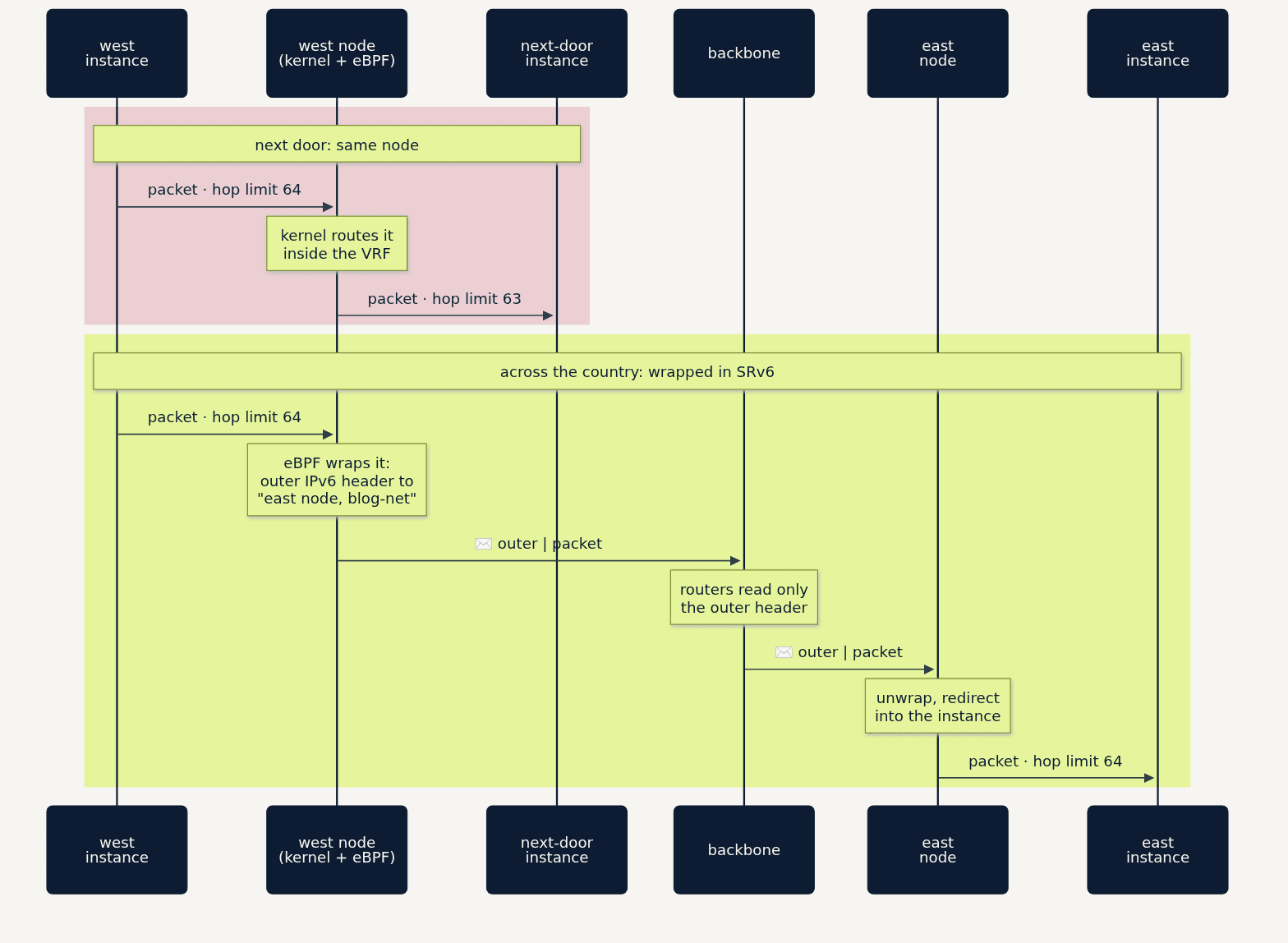
A second effect of the encapsulation is that the MTU doesn't change along the path. It's 1440 on the interface and 1440 all the way across, so a 1392-byte ping (1440 minus 48 bytes of IPv6 and ICMPv6 headers) goes through and 1393 doesn't, from either coast.
On Fly the interface said 1420 but the path was 1370, a mismatch that depends on Path MTU Discovery working, and that usually shows up as large packets going missing.
Datum's own segment routing explainer has the longer explanation and diagrams, and Peter Sprygada's Meet me in the Galactic VPC covers why Galactic is built on SRv6 in the first place.
IPv6 fundamental: hop limit and MTU
The hop limit is IPv4's TTL with a more honest name: every router that forwards a packet takes one off, and at zero the packet is dropped.
That's exactly what traceroute and tracepath exploit.
MTU (the largest packet a link carries) works differently from IPv4 too: IPv6 routers never fragment a packet in transit.
A packet that's too big is dropped, and the sender gets an ICMPv6 "Packet Too Big" and has to send smaller ones.
Every IPv6 link has to carry at least 1280 bytes, and an encapsulated network has to leave room below the underlay's MTU for its outer header.
Datum's 1440 does both, and it's the same on every path.
Try it: tracepath -n <a peer's address>. It shows both lessons at once: the hops, and the pmtu it discovered.
4. Alone on your own link
IPv6 has no broadcast. It has multicast groups instead, and a Datum Compute instance is the cleanest place to see them, because it has exactly one neighbor.

$ ping -c2 ff02::1%eth0             # "all nodes on this link"64 bytes from fe80::a1:feff:fee1:2eec%eth0      ← me64 bytes from fe80::dc26:c3ff:fe17:f279%eth0    ← the router
$ ip -6 neigh                        # NDP: IPv6's ARP tablefd20:0:53::1               lladdr de:26:c3:17:f2:79 routerfe80::dc26:c3ff:fe17:f279  lladdr de:26:c3:17:f2:79 router
$ ip -6 route get fd20:0:53::2:0:0 # same /64, same metrofd20:0:53::2:0:0 via fd20:0:53::1 dev eth0ff02::1means "everyone on this link". Only I and the router answer. The%eth0is a zone index: link-scoped addresses mean nothing until you say which link.- The neighbor cache (NDP, IPv6's replacement for ARP) holds one box, by two names. Its MAC address is embedded in its link-local address:
de:26:c3:17:f2:79becomesfe80::dc26:c3ff:fe17:f279. That's modified EUI-64: split the MAC, insertff:fe, flip one bit. - The other instance in my metro shares my
/64, and I still reach it through the router. A /64 is normally one shared link; here it isn't. Same prefix ≠ same link.
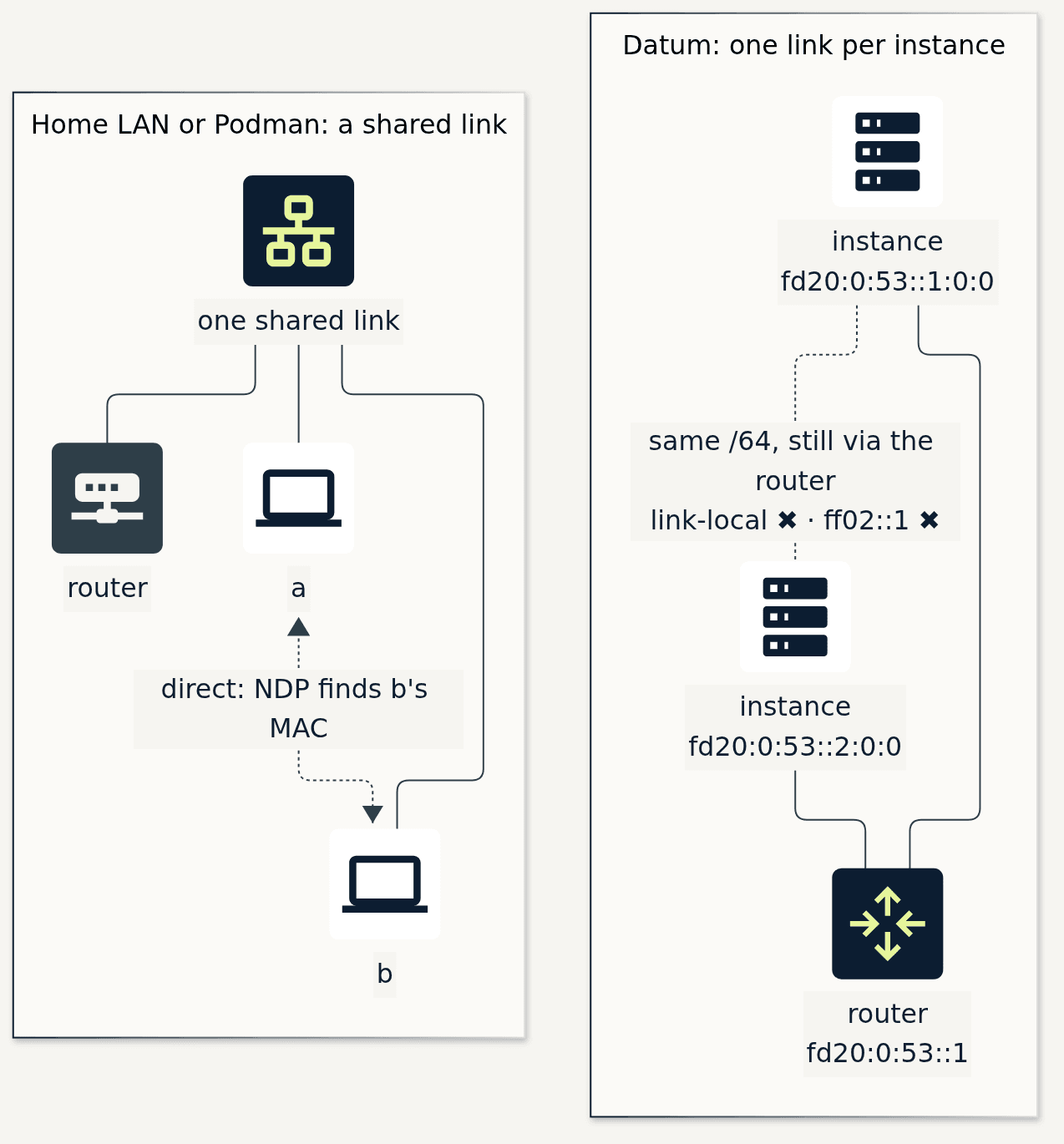
With only one neighbor, the output is small enough to read line by line, which makes a Datum instance a good place to learn IPv6. It's also a security property: an instance can't pose as another's neighbor on a link they don't share.
IPv6 fundamental: no broadcast, just groups
IPv4's ARP asks "who has this address?" of every host on the segment.
IPv6's neighbor discovery asks a tiny group instead: the solicited-node group, ff02::1:ff followed by the last 24 bits of the address being looked up.
On a fresh instance, ip -6 maddr showed exactly that: its link-local fe80::eb:2bff:fe8f:ca3e had joined ff02::1:ff8f:ca3e, and its fd20:0:53::1:0:0 had joined ff02::1:ff00:0.
A lookup only bothers the hosts whose addresses end the same way, which on a big LAN is nearly no one.
Try it: ip -6 maddr show dev eth0 lists the groups your interface has joined. Match them to its addresses.
5. IPv6-only, and everyone can still reach you
Without IPv4 inside the instance, two things still need to work: IPv4 clients reaching the app, and the app reaching IPv4-only destinations. Datum handles both at the edge.

Coming in. My laptop has no IPv6 at all. The Application Load Balancer (ALB) answers on both families, anycast, and opens a fresh IPv6 connection to my instance.
My app sees the ALB's private address as the peer and me in a header:
$ curl -s https://seat-volcano-rghj3.datumproxy.net/answered by: blog-probe-us-west-1-us-west-1-0my address: fd20:0:53::1:0:0/96peer: [fd42:0000:0002:13c6:8c6f:c914:b747:8d41]headers: x-forwarded-for: <my-home-ipv4>Going out. The instance's resolvers do DNS64: ask for an IPv4-only name and you get an IPv6 address inside the well-known prefix 64:ff9b::/96, which NAT64 at the edge translates.
Names work. Literal IPv4 addresses don't, because there's nothing to translate:
$ dig +short AAAA ipv4only.arpa     # RFC 7050: "do you have DNS64?"64:ff9b::c000:aa
$ curl -sS https://ipv4.icanhazip.com67.14.173.129
$ curl -sS --max-time 5 https://1.1.1.1/curl: (7) Failed to connect to 1.1.1.1 port 443 after 0 ms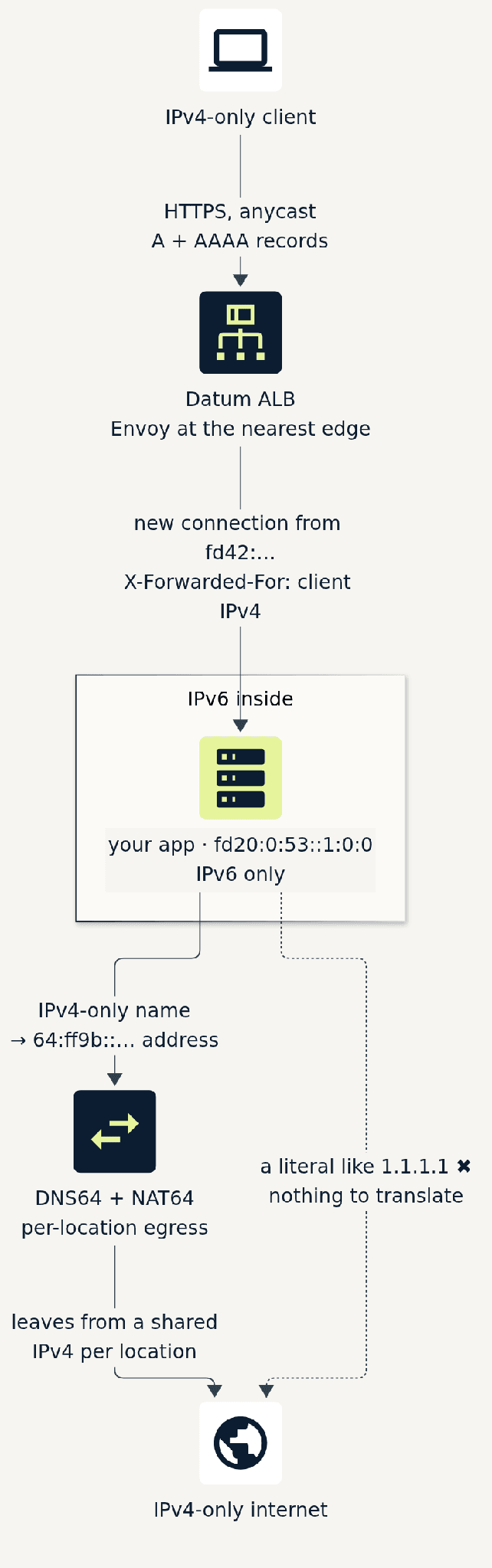
For comparison, I built an IPv6-only VM on Google Cloud. IPv6 connectivity worked, but IPv4-only destinations timed out; DNS64 and NAT64 are left for you to build. On Datum they're part of the platform.
IPv6 fundamental: an IPv4 address can hide inside an IPv6 one
A NAT64 address is the prefix 64:ff9b::/96 plus the IPv4 address in the last 32 bits, written in hex (RFC 6052 defines the layout).
Decode the answer from earlier: 64:ff9b::c000:aa ends in c0 00 00 aa, which is 192.0.0.170, the address RFC 7050 reserves for ipv4only.arpa, precisely so a host can ask "is there DNS64 here?" and recognize the answer.
Try it: dig +short AAAA ipv4only.arpa. Any 64:ff9b:: answer means DNS64 is in the path.
To decode one:
$ python3 -c "import ipaddress; print(ipaddress.IPv4Address(int(ipaddress.ip_address('64:ff9b::c000:aa')) & 0xffffffff))"192.0.0.170Fundamentals must be exercised
Datum was the first platform whose adoption got me over my fears of (and my resistance to) really understanding the fundamentals of IPv6.
For years, IPv6 was something I knew well enough to turn on and not well enough to debug. Whenever it got confusing, there was always IPv4 sitting right there to fall back to, so I fell back to it.
I gained more working understanding of IPv6 working with Claude updating random compose or kubeconfig files into Datum workloads than I had with years of Cisco labs and LinkedIn articles.
A few practical things I picked up along the way:
- Talk to your own workloads privately. From inside an instance, reach another of your workloads by its private IPv6 address rather than its public URL. It's the same habit that keeps traffic on your gVPC.
- Egress is shared per location. Outbound traffic leaves from one shared address per location, which is handy to know if a third party allowlists by IP.
- Pick the runtime for standard images. For a standard container image, pass
--runtime-class=general-purposetodatumctl compute deploy; the default runtime is unikernel. - Bring an assistant. Datum, its docs and
datumctlare designed for an agent-first experience ("AX"). The docs publish anllms.txtand a full-text version for assistants, there are a Docs MCP server and agent skills, anddatumctl api-resourcesanddatumctl explaindescribe the API from the CLI. In practice, an assistant like Claude, pointed at both your current platform's docs and Datum's, is fairly capable of translating configuration from one to the other, IPv4 habits included. It's also a patient IPv6 tutor. Much of the poking around for this post was done that way.
Takeaways
A quick recap on the fundamentals in this post, and the command to use on Datum to try it yourself:
[::], not0.0.0.0. Bind to the IPv6 "any" address. A plain Linux socket on[::]takes IPv4 too; nginx needsipv6only=offfor that. (ss -tln)- Prefixes are just bit counts.
/48network,/64per metro,/96per instance, all assigned, nothing to plan. (datumctl compute instances) - Hop limit counts routers, not miles. SRv6 carries your packet across the country in one hop, with one MTU. (
tracepath -n) - No broadcast, just groups. Multicast and neighbor discovery are easy to read when your only neighbor is the router. (
ping ff02::1%eth0,ip -6 neigh) - IPv4 can live inside IPv6. DNS64 and NAT64 reach the IPv4 internet by name. (
dig AAAA ipv4only.arpa)
Datum Compute is free during beta for the next few months. If you want to try it, deploy a workload, exec into it and run ip -4 route.
Let us know what you find out, whether it's IPv4 cruft in your configs or an IPv6 fundamental that finally clicked: get involved.